Doctor flows
Who this is for#
This document is for product, QA and new team members. It describes what a doctor (DOCTOR role) can do, step by step, as the code behaves today. It covers today's queue, the consultation, the calendar, patients, schedule and covering for a colleague, on web and on mobile. Everything was traced from the source. Anything missing, half-built or inconsistent is listed under Gaps & known limitations.
Where they work#
Doctors work in ProviderOS web (apps/provider-web). ProviderOS now admits every staff role and shows each one only its own work (apps/provider-web/src/lib/access.ts). What a doctor sees depends on whether they also hold a front-desk or admin role:
| Doctor's roles | Top menu in ProviderOS | Lands on |
|---|---|---|
DOCTOR only (a doctor employed by a clinic or hospital) | My queue, My calendar, My patients, plus the consultation screen | /reception, titled My queue |
DOCTOR + CLINIC_ADMIN or HOSPITAL_ADMIN (for example an individual doctor who owns the practice) | The full menu: Today, Reception, Calendar, Patients, Billing, Fulfilment, Analytics, Settings | / Today |
DOCTOR + a front-desk role (Receptionist, Appointment manager, Facility manager) | That role's screens, with the plain labels (Reception, Calendar, Patients) and the whole clinic's data | That role's first screen |
The "My …" labels are literal. For a doctor without a front-desk role, the API returns only their own work (apps/api/src/modules/tenancy/staff-scope.service.ts): the calendar and the patients directory are limited to their own practitioner, and GET /api/v1/queue returns only their own tokens. Hiding menu items is not the protection.
A bookmark or link to a screen outside the doctor's role (for example /billing or /settings/schedule) shows "Not part of your role" ("This screen belongs to another part of the clinic. Ask your clinic admin if you need it.") with a Go to your work button. A screenshot of that card is in 03-front-desk.md, section 1a.
User web is no longer a work surface. A doctor who signs in to User web (apps/patient-web) sees "Your work is in ProviderOS" ("This account works at a clinic, hospital, pharmacy or lab. Your queue, calendar and patients — only the ones that are yours — are in ProviderOS.") with Open ProviderOS and Sign out. The old /workspace ("Clinical day") page and its consultation route are gone; /workspace and /reception now redirect to /.
| Surface | App | Screens |
|---|---|---|
| ProviderOS web | apps/provider-web | Doctor only: /reception (My queue), /calendar (My calendar), /patients (My patients), /patients/[profileId], /consultations/[appointmentId], /settings/security (from the account menu). Admin doctors also get Today, Billing, Fulfilment, Analytics and every Settings page. |
| Mobile | apps/doctor-mobile (standalone). The same doctor workspace also opens inside the unified User app apps/patient-mobile when the account's workspace is "doctor". | Sign in → (two-factor challenge) → (complete profile) → Today (queue) → Consultation. App-bar icons open Schedule and Security, plus Sign out. |
At a glance#
| Journey | Where | Outcome |
|---|---|---|
| Sign in (+ two-factor) | ProviderOS sign-in card. Mobile Sign in → two-factor challenge | Session at the right assurance level, landing on My queue (or Today for an admin doctor) |
| Today's queue | ProviderOS /reception (My queue). Mobile: Today | Patient called, consultation started |
| Consultation | ProviderOS /consultations/[id]. Mobile: Consultation | Visit completed. Prescription, investigations, follow-up and invoice created; patient emailed |
| Today & history side panel | Consultation screen | Next patient called without leaving; notes from this doctor's earlier visits with the patient |
| Covering a colleague's patient | Consultation screen | Encounter opened with a recorded reason; the assigned doctor is emailed |
| Calendar | ProviderOS /calendar (My calendar) | Read-only list of the doctor's own bookings |
| Patients directory | ProviderOS /patients (My patients) | The doctor's own patients and their bookings |
| Schedule | Mobile: Schedule. ProviderOS /settings/schedule for admin doctors only | Weekly hours and time off |
| Account security | ProviderOS /settings/security. Mobile: Security | Authenticator set up or removed |
1. Sign in#
- Sign-in card → email and password → "Sign in".
- Every app uses Supabase email and password sign-in.
- On ProviderOS the sign-up link reads "Setting up a new clinic? Create an account". Doctors added by their clinic don't sign up: they get an email with a set-password link (see 04-clinic-admin.md, section 8).
- Error messages match the patient app, for example "That email and password did not match an account…".
- Two-factor challenge (only if set up).
- If the account has a verified authenticator (TOTP), the next required level is
aal2. The app then asks for "Authenticator code — The 6-digit code from your authenticator app" (web) or "Enter the 6-digit code from your authenticator app" (mobile). - "Verify" runs the Supabase two-factor challenge and verification. "Sign out" abandons sign-in.
- The API also refuses
aal1tokens for accounts that have set up two-factor. - Two-factor is opt-in. Doctors are not forced to set it up.
- If the account has a verified authenticator (TOTP), the next required level is
- Profile completion. A brand-new account sees "What should we call you?". Continue calls
POST /api/v1/me. - Routing.
- ProviderOS: a doctor without a front-desk or admin role is sent from
/to/reception(My queue). An admin doctor stays on Today. Deep links such as/calendarare kept. - User web: shows "Your work is in ProviderOS" (see Where they work).
- Mobile: opens Today.
- ProviderOS: a doctor without a front-desk or admin role is sent from
2. Today's queue#
2.1 ProviderOS — My queue (/reception, doctor without a front-desk role)#
- The page loads
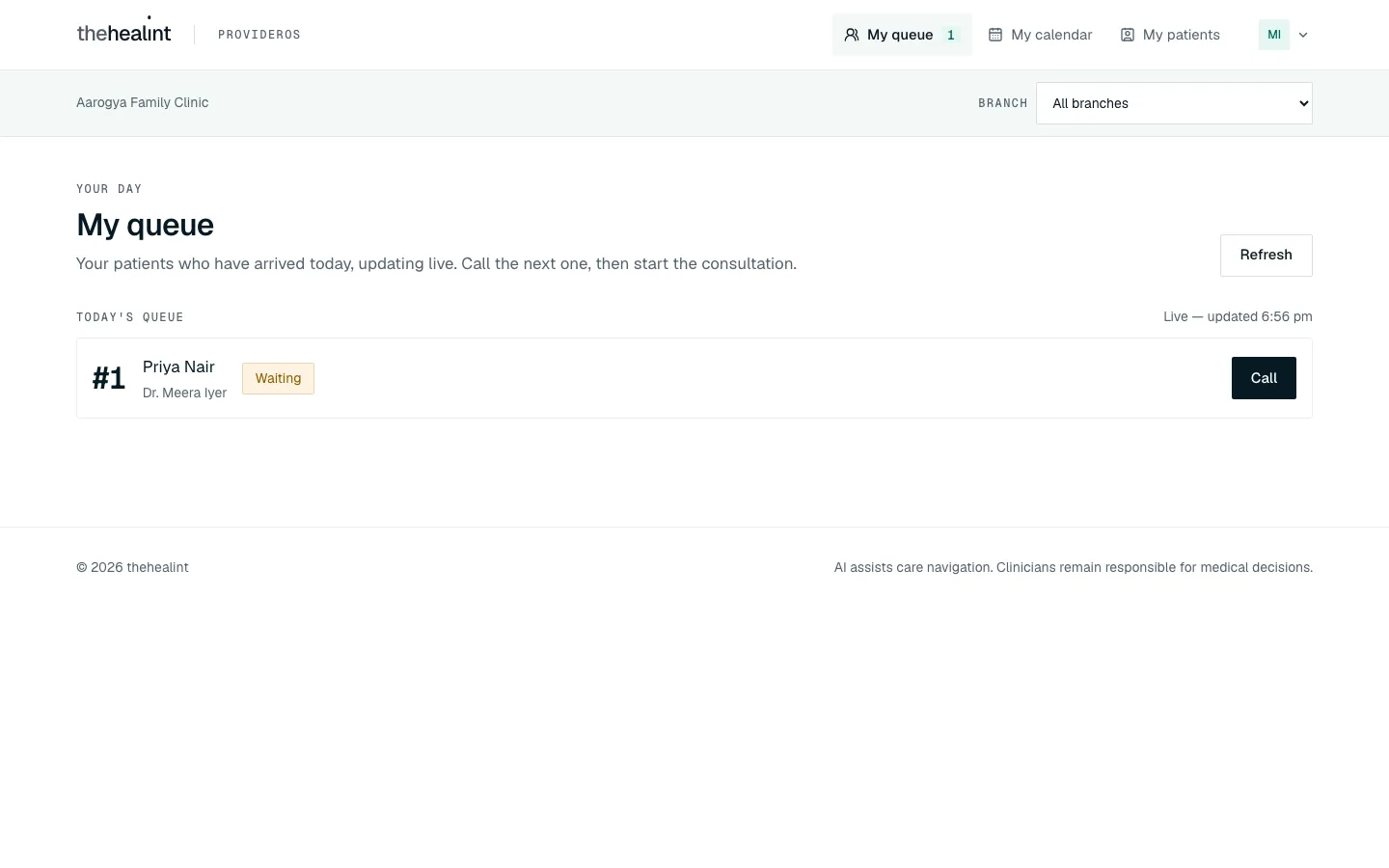
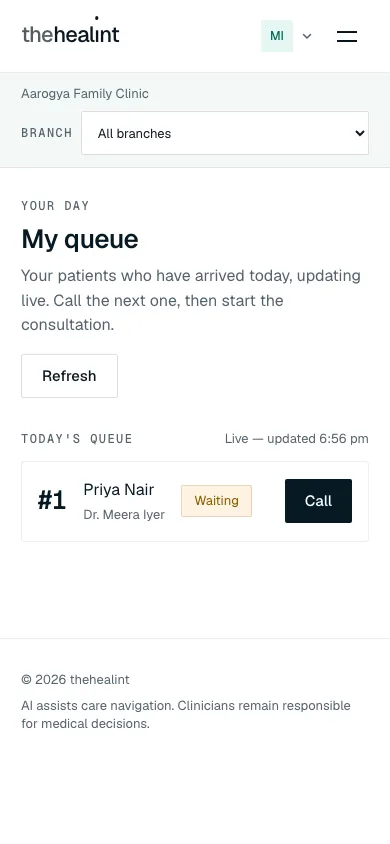
GET /api/v1/queue. The API returns only this doctor's tokens, whatever filter is asked for.- Header: eyebrow "Your day", title My queue, lead "Your patients who have arrived today, updating live. Call the next one, then start the consultation." and Refresh.
- The list updates live through Supabase Realtime on
queue_entries("Live — updated {time}").
- Each row shows "#{token}", the patient (or "{dependent} (dependent of {guardian})"), the doctor and a status pill.
| Token status | Actions |
|---|---|
| Waiting | Call (PATCH /api/v1/queue/{id}/call) |
| Called | Start consultation, which runs start and opens /consultations/{appointmentId}?queueEntryId=…. Also Skip and No-show, each confirmed first: "Skip this token?" or "Mark this token a no-show?". |
| In consultation | Open consultation |
- Status pills use sentence case: Waiting, Called, In consultation, Completed, Skipped, No show.
- Empty: "Nobody is in today's queue yet — Patients appear here as soon as they are checked in."
- Not on this page for a doctor: the walk-in form and the Expected today arrivals list. Those are the front desk's job.
- The My queue item in the top bar carries a live count of this doctor's Waiting tokens.
2.2 ProviderOS — Reception (/reception, admin doctors)#
A doctor who is also a clinic or hospital admin sees the front-desk version of this page, titled Reception: the walk-in form, Expected today (with Check in, Reschedule and Cancel) and the whole organisation's queue, filtered by the top-bar branch selector. It is described, with a screenshot, in 03-front-desk.md, section 3.
2.3 Mobile — Today#
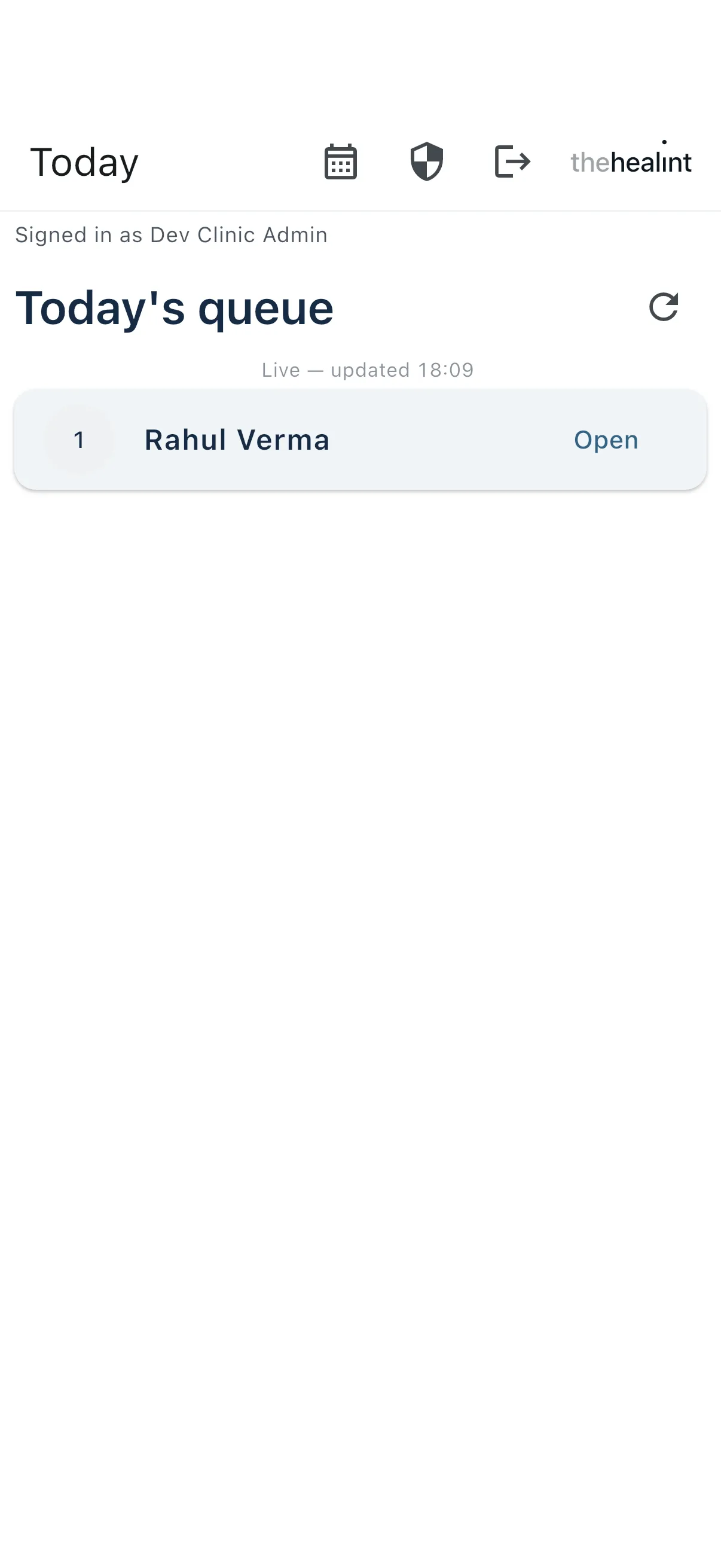
- Today shows today's queue, which updates live over Supabase Realtime. The app bar has icons for Schedule, Security and Sign out.
- Actions:
- Call (Waiting)
- Start consultation (Called)
- Open (In consultation)
- Finished rows show a sentence-case chip: "Completed", "Skipped" or "No show".
3. Consultation#
The consultation screen (ConsultationPanel) lives at ProviderOS /consultations/[appointmentId]. (User web's /workspace/consultations/… copy has been removed.) Mobile has its own Consultation screen.
3.1 Opening the consultation#
- Open consultation → the system calls
POST /api/v1/encounters/startwith theappointmentId.- The appointment must be In consultation. Otherwise: "Cannot start an encounter — this appointment is {STATUS}, not IN_CONSULTATION."
- It must also belong to the doctor's organisation.
- The call is idempotent: one encounter per appointment.
- Loading: "Opening consultation…"
- The system then loads:
GET /api/v1/encounters/{id}. This read is audited asRECORD_VIEWED.GET /api/v1/encounters/{id}/conditions- The patient's pre-visit information, from
GET /api/v1/appointments/{appointmentId}/pre-visit.
- Header:
- "Clinical workspace", the patient's name, and "Consultation in progress" (or "Dependent of {guardian}").
- Hide today & history / Today & history (toggles the side panel, section 3.4) and a Back to queue button, which returns to
/reception.
- Patient context card:
- Patient, Age / date of birth, Biological sex, Blood group, Profile height / weight.
- Known allergies, from the profile or else the pre-visit form.
- Chronic conditions.
- Current medicines, from the pre-visit form.
- Missing values show "Not provided" or "None provided".
3.2 Documenting#
| Section | What the doctor does | System |
|---|---|---|
| Chief complaint & history | Types in Chief complaint and History. The chief complaint is prefilled from the patient's "main issue" / pre-visit symptoms. | Autosaves 0.8 s after typing stops with PATCH /api/v1/encounters/{id}. Status line: "Unsaved changes" → "Saving…" → "Saved". On failure: "Could not save. Your text remains on this screen." |
| Clinical notes & assessment | Clinical notes, Assessment | Same autosave |
| Vitals | Height, Weight, Systolic/Diastolic BP, Pulse, Temperature, SpO₂, Respiratory rate → Save vitals | PUT /api/v1/encounters/{id}/vitals. The server calculates BMI, shown as "BMI 23.4". |
| Diagnoses / conditions | Types a condition → Add (or presses Enter) | POST /api/v1/encounters/{id}/conditions. Empty: "No diagnosis recorded yet." |
| Prescription | Add medicine, then fills Medicine *, Strength, Dose *, Frequency *, Duration *, Route, Instructions. Remove deletes a row. | Kept on screen until completion |
| Investigations | Add investigation: Test name *, Instructions | Kept on screen until completion |
| Follow-up | Recommended date (today or later) and follow-up notes | Kept on screen until completion |
Mobile has the same content, in this order:
- Patient context
- Pre-visit, including attachments (web does not show attachments)
- Complaint / history
- Vitals (with BMI)
- Conditions
- Notes / assessment
- Prescription rows
- Investigations
- Follow-up
- Complete
3.3 Completing#
- "Complete consultation" sits in a sticky footer: "Completion locks this clinical record and creates the patient's record, prescription and invoice."
- Web confirmation dialog: "Complete this consultation? Review the notes, diagnosis, prescription, investigations and follow-up first. The finalized clinical record cannot be edited from this screen."
- Mobile asks the same: "Complete this consultation? This locks the clinical record and creates the patient's record, prescription and invoice." with Keep editing / Complete consultation.
- Checks in the app:
- Each medicine needs a name, dose, frequency and duration ("Each medicine needs a name, dose, frequency and duration.").
- Each investigation needs a test name.
- The system saves the notes (both apps flush any pending autosave first) and calls
POST /api/v1/encounters/{id}/completewith the prescription items (up to 30), investigation requests (up to 20) and an optional follow-up. In one transaction it:- sets the encounter, the appointment and the queue token to Completed;
- creates the prescription (if there are items), capturing the doctor's registration number and council;
- saves investigation requests and the follow-up recommendation;
- writes health-record entries and creates an Issued invoice;
- queues the
prescription.readyemail, and theencounter.follow_up_reminderemail to send on the recommended date.
- Web also calls
PATCH /api/v1/queue/{queueEntryId}/completewhen aqueueEntryIdis present. This is harmless, since the server has already closed the token. The doctor then returns to the queue. - After completion the encounter is locked ("This encounter is already completed."). The finished visit's notes can be read back later from the History list in the side panel of another consultation with the same patient (section 3.4). There is no stand-alone read-only page for a finished consultation.
Pharmacy and lab orders are not sent automatically. The patient chooses a facility afterwards (see 01-patient.md section 8.2).
3.4 Today & history side panel#
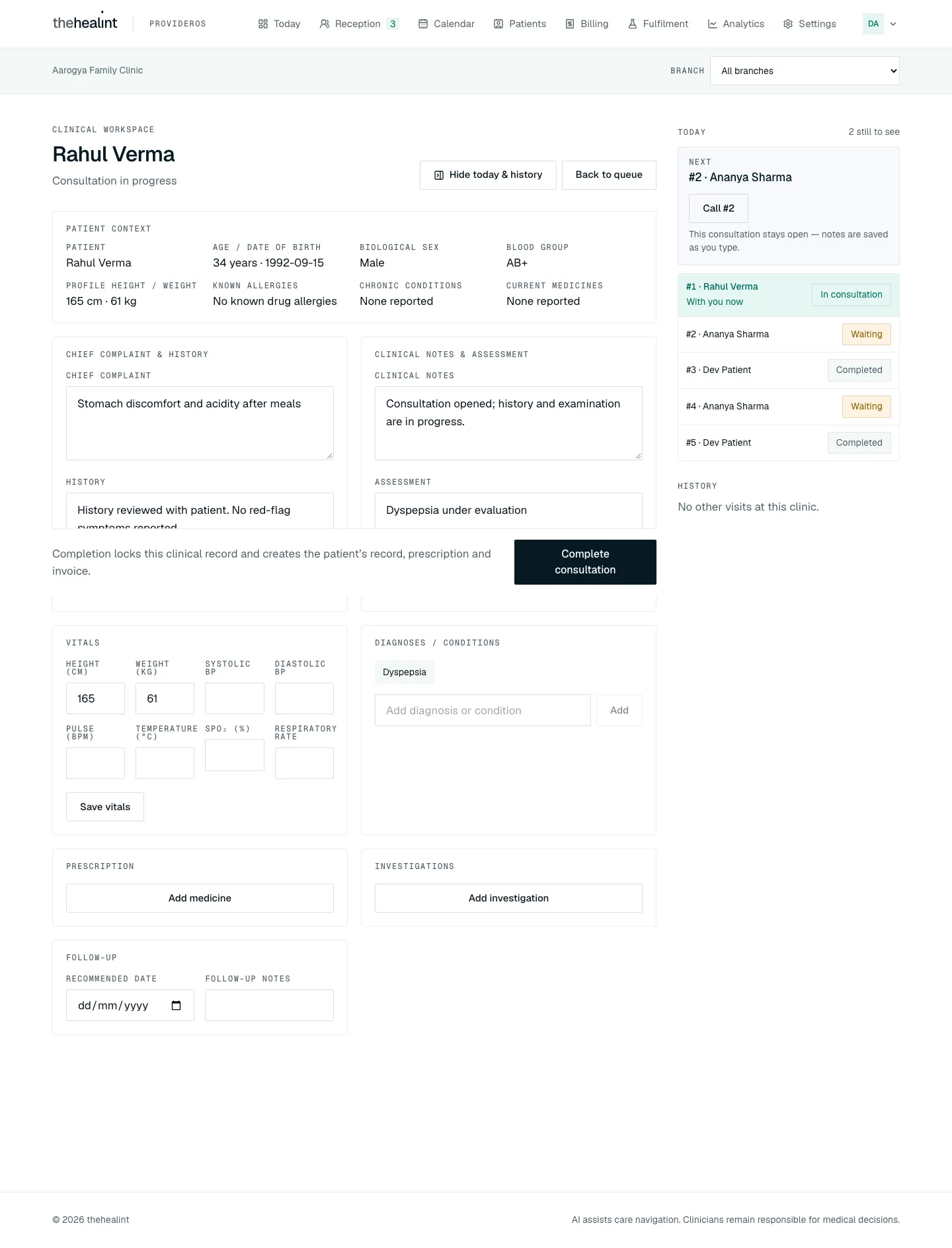
On a wide screen the panel is open by default beside the notes; Hide today & history closes it. On narrower screens Today & history opens it as a drawer.
- Today loads
GET /api/v1/queue. For a doctor-only account the API returns only their tokens; anyone else asks for this appointment's doctor (practitionerId), so the panel always shows that doctor's day.- A count, "{n} still to see".
- A Next card for the next token (someone already called before someone waiting): Call #{token} for a Waiting token, Start and open for a Called one (starts it and opens that consultation), or a link "Open {name}'s consultation" if it is already in consultation. The current consultation stays open and keeps autosaving.
- The list of today's tokens, with the current patient marked "With you now".
- Empty: "Nobody else is checked in today." Errors: "Could not load today's queue." / "Could not update this token."
- History loads the patient's bookings at this organisation from
GET /api/v1/booking/appointments/tenant/patients/{patientProfileId}. For a doctor-only account that is only visits booked with them.- Each visit shows date and time, "{doctor} · {branch}" and a status pill.
- Empty: "No other visits at this clinic."
- Show notes appears on each Completed visit. It calls
GET /api/v1/encounters/visit-summary/{appointmentId}and shows Complaint, Diagnosis, Assessment, Prescribed, Tests and Follow-up. Hide notes folds it away.- The API returns the notes only to the visit's treating doctor: the doctor it was booked with, or the colleague who covered it with a reason. Anyone else gets a 403, shown as "Another doctor treated this visit; their notes stay with them."
- Under the list: "Notes open only for visits you treated (or covered) — other doctors' notes stay with them."
4. Covering a colleague's patient#
- A doctor opens a consultation whose appointment belongs to another doctor in the same organisation.
- The server answers
400 A reason is required to open a colleague's patient record.
- The server answers
- Web shows "This isn't your patient — This appointment belongs to a colleague. Say why you're covering for them, and they'll be notified."
- A Reason for covering field (at least 10 characters, e.g. "Covering while Dr. X is on leave").
- Buttons: Open this patient and Back to queue.
- Open this patient calls
startagain with thecoveringReason. The system:- records the covering doctor and reason on the encounter. Clinical credit stays with the assigned doctor;
- writes an audit entry (
coveringFor,coveringPractitionerId,reason); - emails the assigned doctor (
encounter.covered: "{covering doctor} covered your patient {patient}").
- The consultation shows a warning banner: "You're covering this patient for {assigned doctor}. Reason: {reason}."
- Review. Clinic and hospital admins (
encounter.audit) review events at ProviderOS/settings/covering-access.- A table shows Date, Patient, Assigned to, Covered by and Reason, filtered by From/To dates.
- A doctor without an admin role has no Settings menu; opening the address directly shows "Not part of your role".
- Mobile shows the same prompt: "This isn't your patient", a Reason for covering field (at least 10 characters) and Open record / Go back. Going back returns to the queue.
5. Calendar (ProviderOS /calendar, "My calendar")#
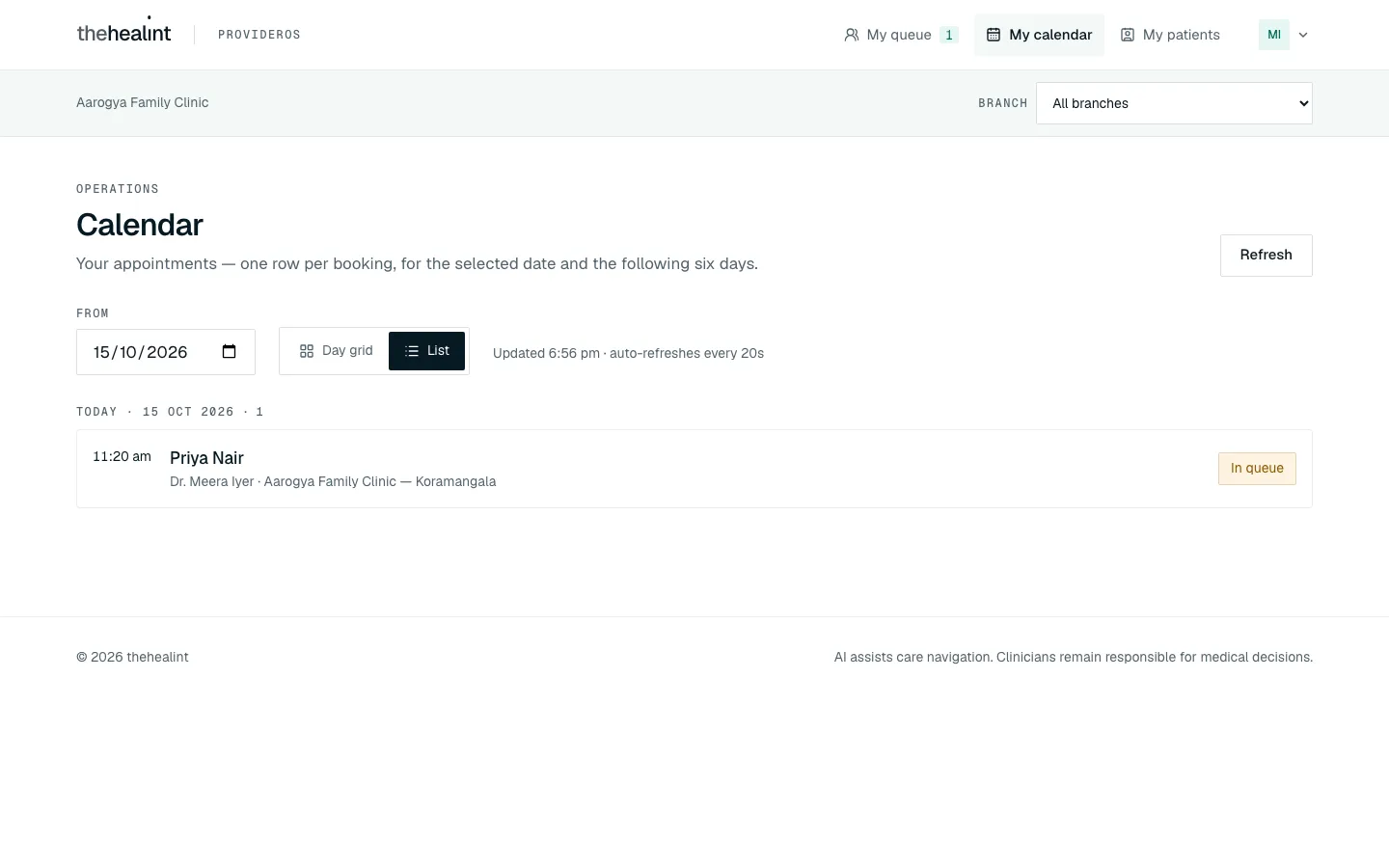
- Pick a date. A doctor without a front-desk role starts on the List view: the selected date and the six days after it, from
GET /api/v1/booking/appointments/tenant?fromDate=…&days=7. The API returns only this doctor's appointments. The page refreshes every 20 seconds ("Updated {time} · auto-refreshes every 20s"). - Rows are grouped by day ("Today · …"). Each row shows time, patient, doctor · branch, and a status pill: Held, Booked, Confirmed, Checked in, In queue, In consultation, Completed, Cancelled, Expired, Rescheduled, No show.
- Day grid is one click away: one column per doctor for a single day (for a doctor-only account, just their own column). The grid is described in 03-front-desk.md, section 4a.
- Read-only for doctors. There is no Check in, Reschedule or Cancel, on the rows or in the drawer. Moving and cancelling bookings is the front desk's job. (A doctor who is also an admin gets the front-desk calendar, with the grid as the default view and all three actions.)
- Clicking a patient opens the appointment drawer:
- Status, source, doctor, branch, fee and reason.
- Before the visit: the pre-visit answers, shown only to the treating doctor (see Permissions & privacy). Anyone else sees "Only the treating doctor can see what the patient shared before the visit."
- History: the status timeline.
- Open consultation while the appointment is In consultation.
- Empty: "No appointments in this seven-day window — Choose another date — your bookings appear here as patients book them."
Screenshots of the front-desk calendar, the day grid and the appointment drawer are in 03-front-desk.md, section 4.
6. Patients directory (ProviderOS /patients, "My patients")#
- Search by name. Search is debounced and calls
GET /api/v1/booking/appointments/tenant/patients?q=…. For a doctor-only account the API returns only patients who have booked with this doctor, up to the first 200. An admin doctor sees everyone who has booked with the organisation. - Each row shows the name, "{n} bookings", "Next {date}" and "Last booking {date}".
- Open a patient (
/patients/[profileId]):- Tiles: Bookings, Completed visits, Last completed.
- Upcoming and History lists, again limited to this doctor's bookings. Each row opens the same appointment drawer as the calendar.
- Empty states: "No patients yet", or "No patients match "{q}"".
- Clinical notes are not on this page. The directory shows bookings only. A doctor reads their own past notes for a patient from the consultation's side panel (section 3.4).
Screenshots of the patients list and a patient page are in 03-front-desk.md, section 5.
7. Schedule#
ProviderOS — Weekly availability (/settings/schedule, admin doctors only)#
A doctor without an admin role has no Settings menu, and opening /settings/schedule shows "Not part of your role". Their hours are set by a clinic admin. Adding and removing hours needs schedule.manage, which DOCTOR does not hold; an admin doctor gets it through CLINIC_ADMIN or HOSPITAL_ADMIN.
For admin doctors the page has a week grid where hours are drawn by dragging, a Hours set list with Remove, and a Time off section. It is described with screenshots in 04-clinic-admin.md, section 7.
Mobile — Schedule#
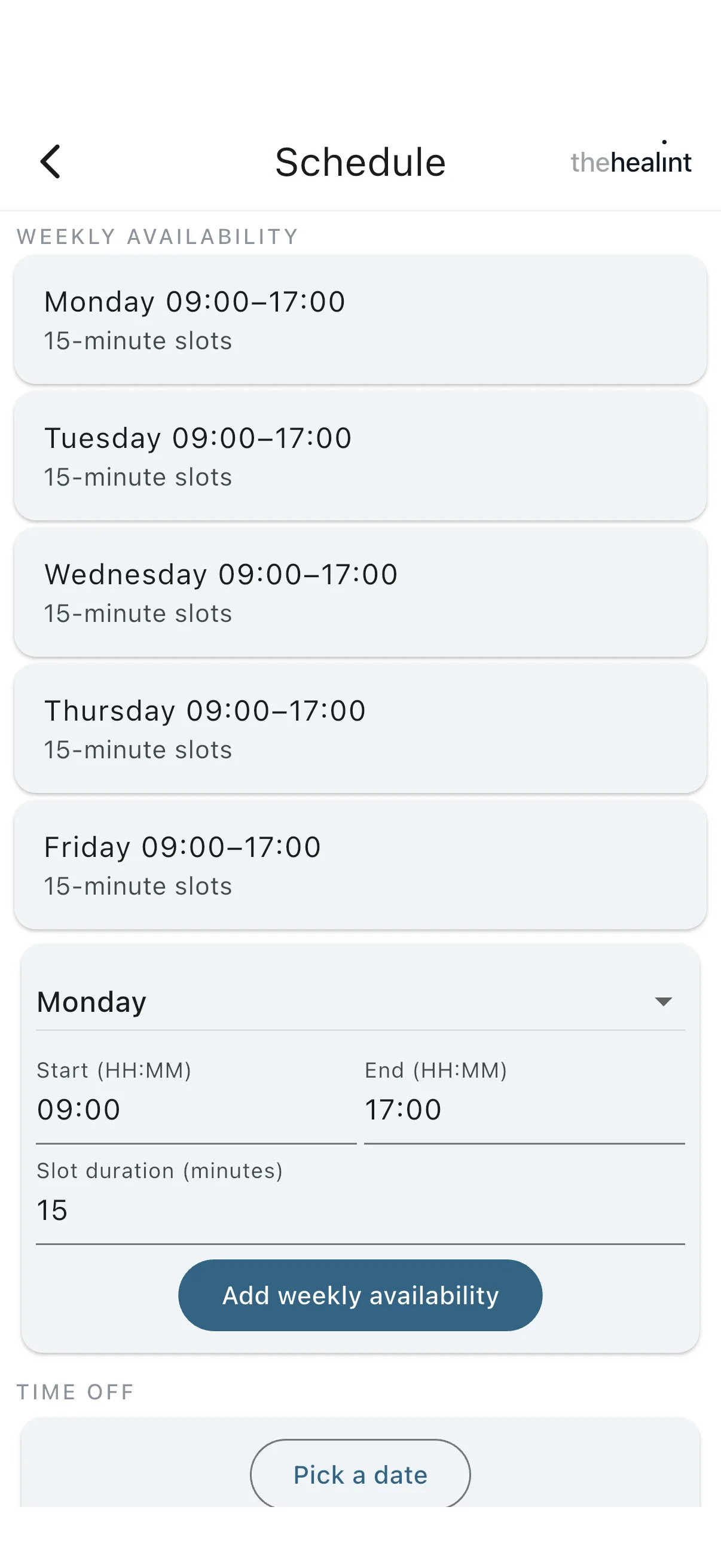
- Shows weekly availability and time off: a whole day off, or changed hours for a date.
- The doctor can add entries but cannot edit or delete them. Removing is only on ProviderOS web (
DELETE /api/v1/schedule-rules/:id,DELETE /api/v1/schedule-exceptions/:id). - Adding also needs
schedule.manage, so on a doctor-only account the save is refused by the API.
8. Account security#
- ProviderOS
/settings/security(in the account menu under "Security"; every staff member can open it, including a doctor without Settings):- Set up an authenticator app (TOTP): enrol, scan, then enter the "Code from the app" and press Confirm. The page confirms "Two-factor authentication is now active on this account."
- Remove an authenticator (with a confirmation).
- With none set up, the page shows "Two-factor authentication is off".
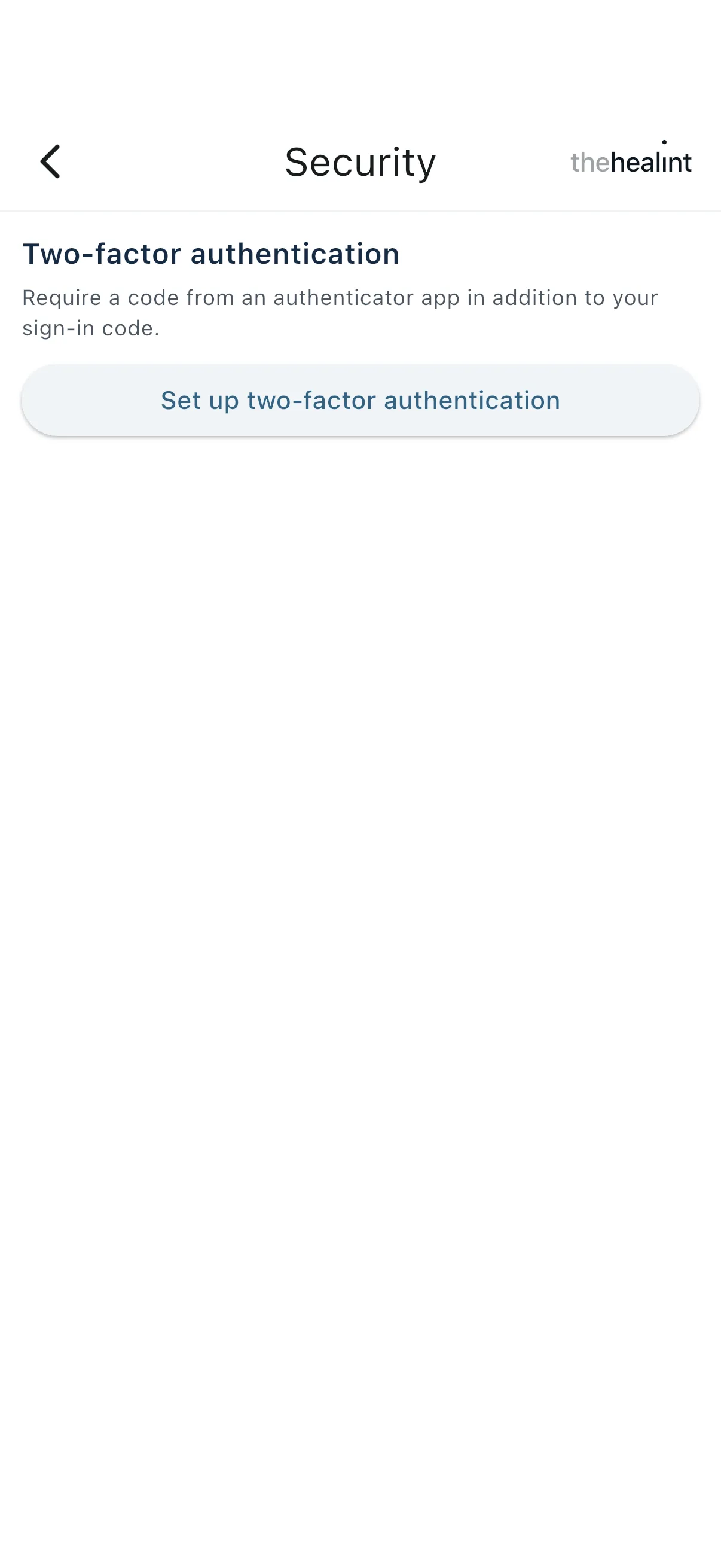
- Mobile Security screen: set up two-factor. The secret key is shown as text with no QR code.
Permissions & privacy#
| Permission | Who holds it | What it allows |
|---|---|---|
encounter.manage | DOCTOR, PLATFORM_ADMIN only | Start, read, autosave, vitals, conditions and complete encounters. Read pre-visit information (treating doctor only, below). |
encounter.audit | CLINIC_ADMIN, HOSPITAL_ADMIN, PLATFORM_ADMIN (not DOCTOR) | Covering-access review |
queue.manage | Receptionist, nurse, doctor, facility manager, clinic and hospital admin, appointment manager, platform admin | Call, start, complete, skip and no-show tokens; walk-ins; daily summary |
schedule.manage | Clinic admin, hospital admin, facility manager (not DOCTOR) | Add and remove weekly hours and time off |
What a doctor can see
- Their own work only, unless they also hold a front-desk or admin role. The API scopes the calendar, the patients directory and the queue to the doctor's own practitioner record (
StaffScopeService). A doctor account with no practitioner record gets "No practitioner profile is linked to this account yet — ask your clinic admin to set one up." - The patient's pre-visit symptoms, medicines, allergies and attachments, for their own appointments. Only the treating doctor can read them: the doctor the appointment is booked with, or a colleague who opened it as cover with a reason. Other doctors and every non-doctor (reception, nurses, billing, clinic admins) get a 403, and the drawer says "Only the treating doctor can see what the patient shared before the visit."
- Past visit notes (
GET /api/v1/encounters/visit-summary/:appointmentId) on the same rule: treating or covering doctor only. - Patient context from the profile: date of birth, sex, blood group, height and weight, allergies, chronic conditions.
What a doctor cannot see or do
- Patients at other organisations, or other doctors' bookings and queues at their own.
- Reception arrivals, walk-ins, check-in, reschedule or cancel (unless they also hold a front-desk role).
- The covering-access review screen, staff management and the other Settings pages, unless they also hold
CLINIC_ADMINorHOSPITAL_ADMIN. - Edit a completed encounter.
- Access a colleague's patient without giving a reason when the encounter is first opened.
Patient view of clinical notes. The patient's own encounter summary leaves out clinicalNotes.
Audit. Encounter reads and edits, queue actions and covering access are all written to the audit log.
Gaps & known limitations#
Covering access
- Covering access is checked only when the encounter is opened. Once an encounter exists, any doctor in the organisation can read, edit or complete it with no reason and no alert. The reason is also not repeated if a second colleague opens it later; the first covering reason is kept.
No covering-reason prompt on mobile— fixed. Mobile still shows no "You're covering…" banner inside the consultation."Only the treating doctor" copy was inaccurate— fixed: pre-visit notes are now limited to the treating (or covering) doctor.
Consultation
Unsaved prescription lost on refresh— fixed (Release 1.4): medicines, investigations and follow-up save as a draft (PUT /api/v1/encounters/:id/draft,encounters.order_draft) a second after each change, are restored on reopening ("Restored what you had typed before"), and are cleared on Complete. Same in the doctor iPhone app.- Some data cannot be corrected or reloaded. Diagnoses cannot be removed. Saved vitals (other than profile height and weight) are not reloaded when the consultation is reopened.
- Web consultation does not show pre-visit attachments. Mobile does.
Mobile Complete had no confirmation and didn't save pending notes— fixed; it also now checks each medicine has dose, frequency and duration before sending.- Past notes only from inside a consultation. A doctor reads an earlier visit's notes from the side panel's History while consulting the same patient; there is no stand-alone read-only page for a finished visit, and nothing on mobile.
- History is limited to this organisation and to the doctor's own visits. There is no wider clinical timeline or documents view for a doctor (
health_record.readexists but no route uses it).
Queue
No live updates on the User web queue— that page is gone; ProviderOS and mobile both update live.Mobile showed raw queue chips ("NOSHOW")— fixed.- Skipped tokens cannot be recalled. No "recall" action exists.
Calendar, patients and schedule
- No calendar or patients directory on mobile, and no covering-access review.
- A doctor cannot set their own hours.
DOCTORlacksschedule.manage, so the mobile Schedule's add form is refused by the API and the web page is admin-only. Mobile is also still add-only (no remove).
Security and display
- Two-factor is optional for doctors. Setup exists in ProviderOS (now open to every doctor through the account menu) and on mobile (key as text, no QR code). The ProviderOS and mobile security copy mentions a "sign-in code" or "email code", but sign-in uses a password.
Developer "API: ok" line on mobile— removed.Doctors without— fixed: every staff role is admitted and sees its own screens.CLINIC_ADMINcould not use ProviderOS
Related#
- 01-patient.md — patient flows
- 03-front-desk.md — reception, check-in, walk-ins, billing
- 04-clinic-admin.md — clinic administration in ProviderOS
- 05-pharmacy-lab.md — pharmacy and lab fulfilment
- 06-platform-admin.md — platform administration
Region (added Oct 2026)#
The queue, calendar and visit times follow the organization's time zone: "today" is decided on the clinic's calendar, slots are generated on its clock (daylight saving included), and the follow-up reminder email goes out at 09:00 clinic time on the recommended date.
PDF version
The same guide with all its screenshots, to print or share. (0.5 MB)
Download the PDF Open in a new tab
Loading the PDF viewer… If it does not appear, your browser cannot show PDFs inside a page: use Download the PDF.