Front desk: reception, appointments, nursing and billing
Who this is for#
This document covers the four front-desk roles: Receptionist, Appointment manager, Nurse and Billing. They run the day at the counter. They check in booked patients, register walk-ins, call tokens from the queue, move or cancel bookings over the phone and collect payment. It describes what the code does today, screen by screen, and states plainly where the product does not yet do what these roles need.
Read this first. The front-desk screens (Reception, Calendar, Patients and Billing) are all in ProviderOS web (
apps/provider-web), and every front-desk role can now sign in there. ProviderOS admits every staff role and shows each one only its own work (apps/provider-web/src/lib/access.ts); the API enforces the same boundaries on the data. The old User-web Work page (/workspace) is gone.
Where they work#
| Role | ProviderOS top menu | Lands on | What they get |
|---|---|---|---|
| Receptionist, Appointment manager | Reception, Calendar, Patients, Billing | /reception | The whole front desk: walk-ins, Expected today, the queue, every doctor's calendar, the patients directory, billing |
| Nurse | Reception only | /reception | Today's queue only: no walk-in form and no Expected today |
| Billing | Billing only | /billing | Invoices, collection and discounts |
| Clinic / Hospital admin, Facility manager | Everything (Today, Fulfilment, Analytics and Settings as well) | / Today | Covered in 04-clinic-admin.md |
| Surface | App | Who can open it |
|---|---|---|
| ProviderOS web | apps/provider-web | Every staff role, each with its own menu (above) |
| User web | apps/patient-web | Not a work surface. Staff who sign in see "Your work is in ProviderOS" with Open ProviderOS; /workspace and /reception redirect to / |
| iPhone: the User app's staff workspace | apps/patient-mobile (it opens the ProviderOS mobile home screen) | Receptionist and Appointment manager get a Calendar tab; Nurse and Billing get a "Your work is on ProviderOS web" message (section 1c). No reception, check-in or queue screens |
At a glance#
| Journey | Where | Outcome |
|---|---|---|
| Sign in | ProviderOS web sign-in | Each role lands on its first working screen |
| Today | ProviderOS / (admins only) | Day's counts (appointments, walk-ins, no-shows, wait, money) |
| Check in a booked patient | ProviderOS /reception → Expected today | Appointment becomes Checked in and gets a queue token |
| Register a walk-in (incl. dependents) | ProviderOS /reception → Register a walk-in | Patient found or registered, joins today's queue with a token |
| Run the queue | ProviderOS /reception → Today's queue | Token moves Waiting → Called → In consultation, or ends as Skipped / No show |
| Waiting badge | ProviderOS top navigation | Live count of Waiting tokens next to Reception |
| Calendar, drawer, reschedule, cancel | ProviderOS /calendar | Day grid (a column per doctor) or seven-day list; booking moved or cancelled with an email to the patient |
| Patients directory | ProviderOS /patients, /patients/[profileId] | Everyone who booked here, with their visit history |
| Billing and collecting payment | ProviderOS /billing | Day's invoices; counter payment recorded; discount applied |
1. Sign in#
1a. Signing in to ProviderOS web#
- Sign-in card (ProviderOS wordmark) → enter Email and Password → Sign in (shows "Signing in…").
- Wrong password: "That email and password did not match an account. If you normally sign in with a code, use that instead."
- Too many tries: "Too many attempts. Please wait a minute and try again."
- A new staff member doesn't sign up. Their clinic admin adds them under Settings → Staff, and they get an email with a set-password link that opens ProviderOS's Set your password page (see 04-clinic-admin.md, section 8).
- While the session is checked the card shows "Checking your session…".
- Two-factor check. If the account has an authenticator app enrolled (Settings → Security, from the account menu), the system asks for an Authenticator code ("The 6-digit code from your authenticator app") → Verify. Nothing else opens until this passes.
- First sign-in only. If no profile exists yet, it asks "What should we call you?" → Continue. This creates the profile (
POST /api/v1/me). - The system reads the account's organization memberships (
GET /api/v1/me/tenants), works out the roles held at that organization, and opens the role's first screen: Today for admins, Reception for Receptionist, Appointment manager and Nurse, Billing for Billing. Deep links (for example/calendar) are kept.- Platform staff: the card "Use Platform Admin".
- If the API is down, a red API unreachable pill appears in the organization bar at the top.
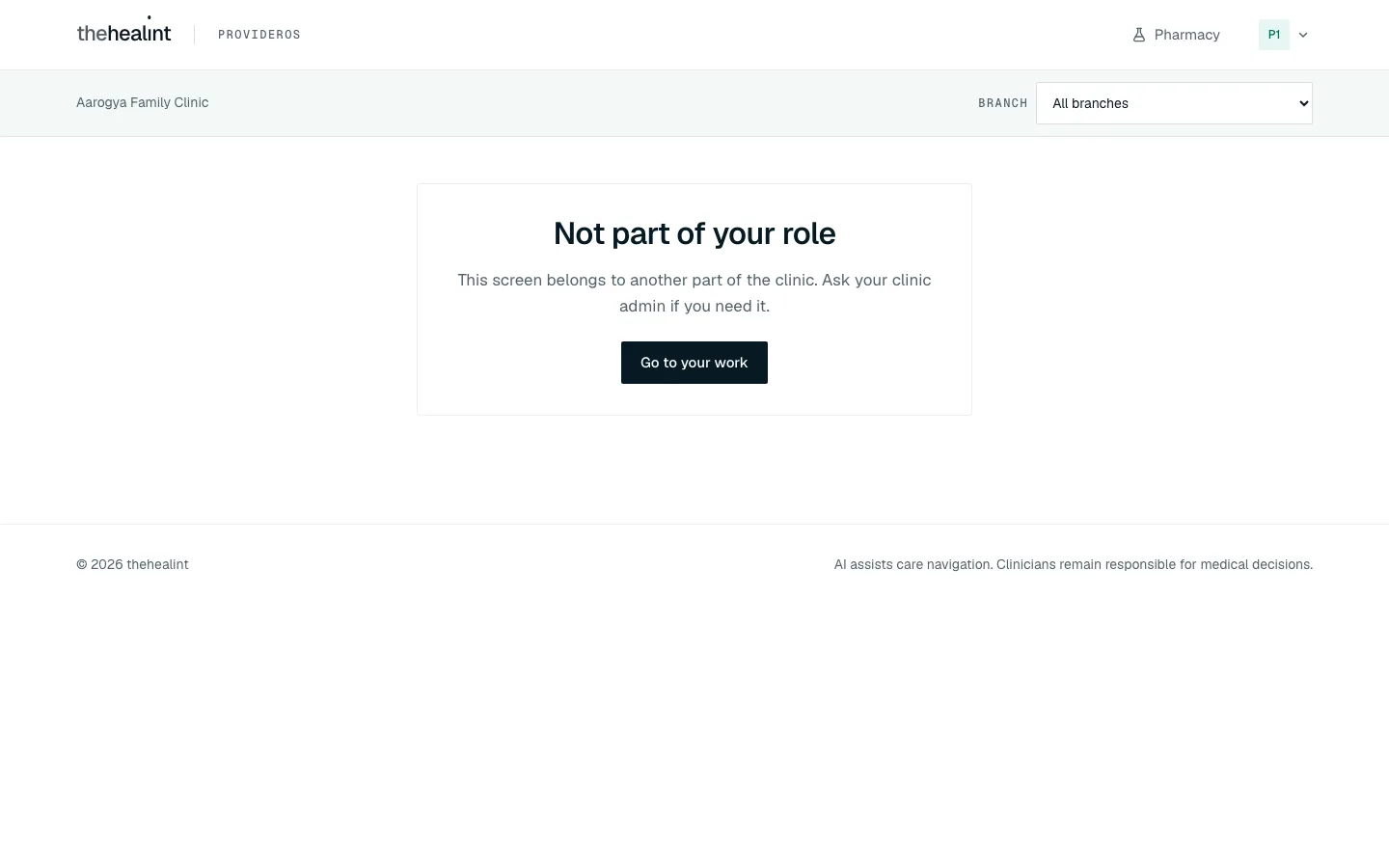
- Screens outside the role. The menu only lists the role's own screens. A link or bookmark to any other screen shows "Not part of your role":
1b. User web#
Front-desk accounts that sign in to User web see "Your work is in ProviderOS" ("This account works at a clinic, hospital, pharmacy or lab. Your queue, calendar and patients — only the ones that are yours — are in ProviderOS.") with Open ProviderOS and Sign out. The old Work page is gone; /workspace and /reception redirect to /.
1c. iPhone#
Front-desk accounts use the unified User app (apps/patient-mobile). After sign-in it puts Receptionist, Appointment manager, Nurse and Billing accounts (without the Doctor role) in the staff workspace, which is the ProviderOS mobile home screen with tabs chosen by role (apps/provider-mobile/lib/screens/home_screen.dart):
- Receptionist and Appointment manager: a Calendar tab (date and branch filter, read-only list).
- Nurse and Billing: no tabs, just "Your work is on ProviderOS web — open it on the clinic computer or in your browser."
The standalone ProviderOS mobile app (apps/provider-mobile) admits every staff role and shows the same role-based tabs. Only an account with no staff role at all sees "ProviderOS is for clinic, hospital, pharmacy and lab staff. This account has no staff role — patients use the thehealint User app." with a Sign out button.
2. Today (ProviderOS /)#
Today is on the menu for clinic admins, hospital admins and facility managers only. Receptionists, appointment managers, nurses and billing staff start on their own screen instead.
Screenshots of Today (desktop, 1024 px and phone width) are in 04-clinic-admin.md, section 3.
- Today → page opens → the system loads the organization (
GET /api/v1/tenants/:id), its verification history and the day's operations summary (GET /api/v1/queue/tenant/daily-summary, needs the queue-management permission). - The user sees Today at a glance tiles: Appointments, Walk-ins, No-shows, Avg wait (minutes, or "—"), Completed, Billed, Collected, Outstanding.
- Loading: "Loading today's numbers…".
- If the account lacks queue management, the tiles are replaced by "Today's numbers aren't available on this account. They come from the reception queue, which needs the queue-management permission."
- The top of the page also shows organization-level controls (verification pill and Publish to marketplace / Unpublish). Those are owner tasks, described in 04-clinic-admin.md.
- The numbers cover every branch. The branch selector does not narrow this page.
3. Reception (ProviderOS /reception)#
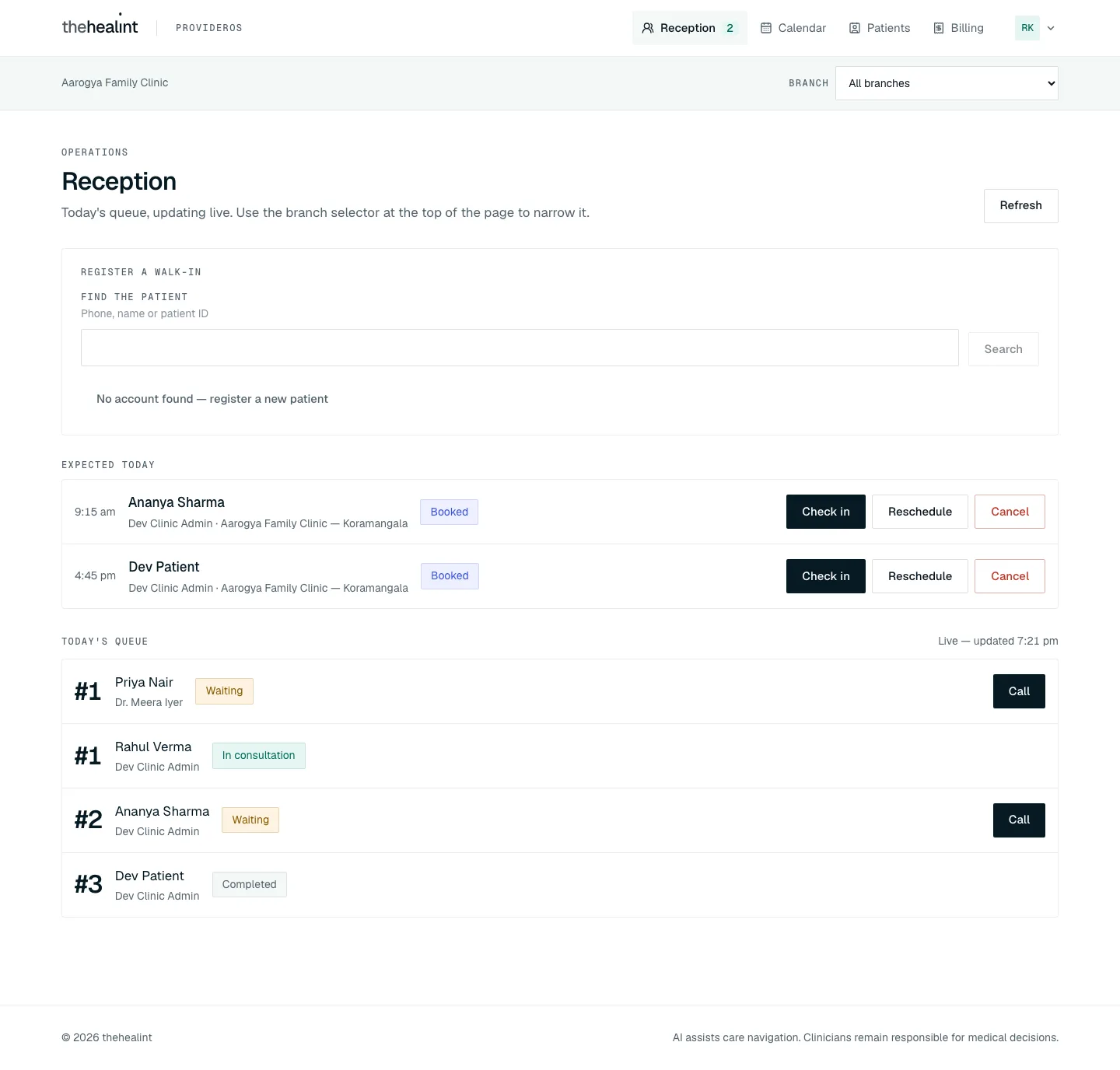
The page header reads Reception: "Today's queue, updating live. Use the branch selector at the top of the page to narrow it." A Refresh button reloads both lists. The page has three blocks, top to bottom: Register a walk-in, Expected today, Today's queue.
Who sees which blocks. Receptionists, appointment managers and admins (anyone with a front-desk role) get all three. A Nurse gets only Today's queue, with Call, Skip and No-show. A doctor without a front-desk role gets their own queue as My queue (see 02-doctor.md, section 2.1).
Branch scope. If the organization has more than one branch, a Branch selector ("All branches" or one branch) sits in the organization bar at the top of every page. Reception, the walk-in form and the waiting badge all follow it.
3a. Check in a booked patient (Expected today)#
- Expected today → the system asks for today's appointments (
GET /api/v1/booking/appointments/tenant?fromDate=today). It keeps only those still Booked or Confirmed.- Loading: "Loading today's booked arrivals…".
- Empty: "Nobody is still expected today. Everyone booked for today has either arrived or been seen…".
- Error: the message with a Retry button.
- Each row shows the time, the patient's name (click it to open the appointment drawer, see §4c), doctor · branch and a status pill (Booked or Confirmed).
- Row actions: Check in, Reschedule, Cancel.
- Check in → the button changes to "Checking in…" → the system calls
PATCH /api/v1/booking/appointments/:id/check-in. The appointment moves to Checked in and joins today's queue with a token number.- The patient can also check themselves in from their phone. Either way the row leaves Expected today and appears in Today's queue straight away, because both lists refresh on every queue change.
- There is no confirmation dialog, by design. Check-in can be undone operationally and is the most frequent desk action.
- Failure: "Could not check name in." (or the server's reason, e.g. "Cannot check in — this appointment is CANCELLED", which shows the raw status) shows above the list.
- Notifications: none. Check-in sends no email or message.
3b. Register a walk-in, including dependents#
Card title: Register a walk-in. The whole sequence happens in one card.
- Find the patient ("Phone, name or patient ID") → type at least 2 characters → Search (or press Enter) →
GET /api/v1/patients/search?q=….- Loading: "Searching…".
- Results list each person's name, phone (or "No phone on file") and "· N dependent(s)", each with a Select button.
- No match: "No patient matches that. Register them below — a walk-in still needs an account to hang the visit off." with Register a new patient.
- New patient → No account found — register a new patient → fill Full name, Phone, Email (optional) → Register patient ("Registering…") →
POST /api/v1/patients/register. The new person becomes the selected patient.- Failure: "Could not register this patient — they may already have an account (search for them instead)."
- Selected patient → the card shows the name and a Change patient link.
- Who is this visit for? → choose the account holder ("Name (the account holder)") or one of their dependents ("Name (relationship)").
- Add a dependent (optional) → Name + Relationship → Add →
POST /api/v1/patients/:guardianId/dependents. The new dependent is added to the list and selected automatically. - Branch (shown only when the page is set to "All branches") → choose one. Practitioner → choose from the doctors at that branch (
GET /api/v1/branches/:branchId/practitioners).- Placeholder states: "Pick a branch first", "Loading practitioners…", "Nobody practises at this branch yet", "Select a practitioner".
- Each option reads "Practitioner xxxxxxxx · ₹fee". It shows the first eight characters of an internal id, not the doctor's name (see Gaps).
- Add to queue ("Adding to queue…") →
POST /api/v1/booking/walk-ins. The system creates an appointment already Checked in (source Walk in) and gives it the next token in today's queue.- Success: "Name added to the queue." The form resets and both lists refresh.
- Failure: "Could not register this walk-in — the practitioner may just have become busy, try again."
- Notifications: none.
3c. Run the queue (Today's queue)#
- Today's queue →
GET /api/v1/queue(filtered to the selected branch). A caption reads "Live — updated time".- The list updates live (Supabase Realtime on queue entries). It also refetches whenever the live connection is re-established.
- Empty: "Nobody is in today's queue yet. Register a walk-in above, or wait — a patient checking in online appears here automatically."
- If a background refresh fails, the last good list stays on screen rather than blanking.
- Each row shows #token, the patient's name (for a dependent: "Dependent (dependent of guardian)"), the doctor, and a queue status pill.
- Actions depend on status:
| Status shown | Buttons | What happens |
|---|---|---|
| Waiting | Call | PATCH /api/v1/queue/:id/call → status Called |
| Called | Start consultation (Doctor role only), Skip, No-show | Start: PATCH …/start → In consultation, then opens /consultations/:appointmentId. Skip/No-show ask first (below). The desk doesn't see Start or Open consultation; it sees the token move when the doctor starts. |
| In consultation | Open consultation | Opens the consultation screen (doctor's clinical workspace) |
| Completed, Skipped, No show | none | Final states |
- Skip → dialog "Skip this token?" ("Their turn ends and cannot be resumed — seeing them today would mean registering a new walk-in.") → Skip token →
PATCH …/skip→ Skipped. - No-show → dialog "Mark this token a no-show?" ("…the visit counts toward today's no-show figures on the Today page.") → Mark no-show →
PATCH …/no-show→ No show.- If the action fails (for example someone else already moved the token), the dialog stays open with the error.
- Completing a token is not a Reception button. The token reaches Completed when the doctor finishes the consultation.
- The server also accepts Skip and No-show on a Waiting token. The screen only offers them once the token is Called.
- Notifications: none. Calling a token does not send the patient a message.
3d. Waiting badge#
- In the top navigation, Reception shows a number badge labelled "waiting" (for example "Reception 3" in the screenshots in this document).
- It counts only queue entries in Waiting (not Called or In consultation) for the currently selected branch.
- It updates live from the same Realtime feed. There is no polling.
- If the count can't be loaded (no permission, request failed), the badge is simply hidden. No error is shown.
4. Calendar (ProviderOS /calendar)#
Front-desk roles and admins see every doctor's bookings. The API limits a doctor without a front-desk role to their own ("My calendar", see 02-doctor.md, section 5), and refuses Nurse and Billing ("Your role does not include the calendar."); those two roles also have no Calendar in their menu.
The page has two views, switched by Day grid | List next to the date. Front-desk accounts start on Day grid.
4a. Day grid (default)#
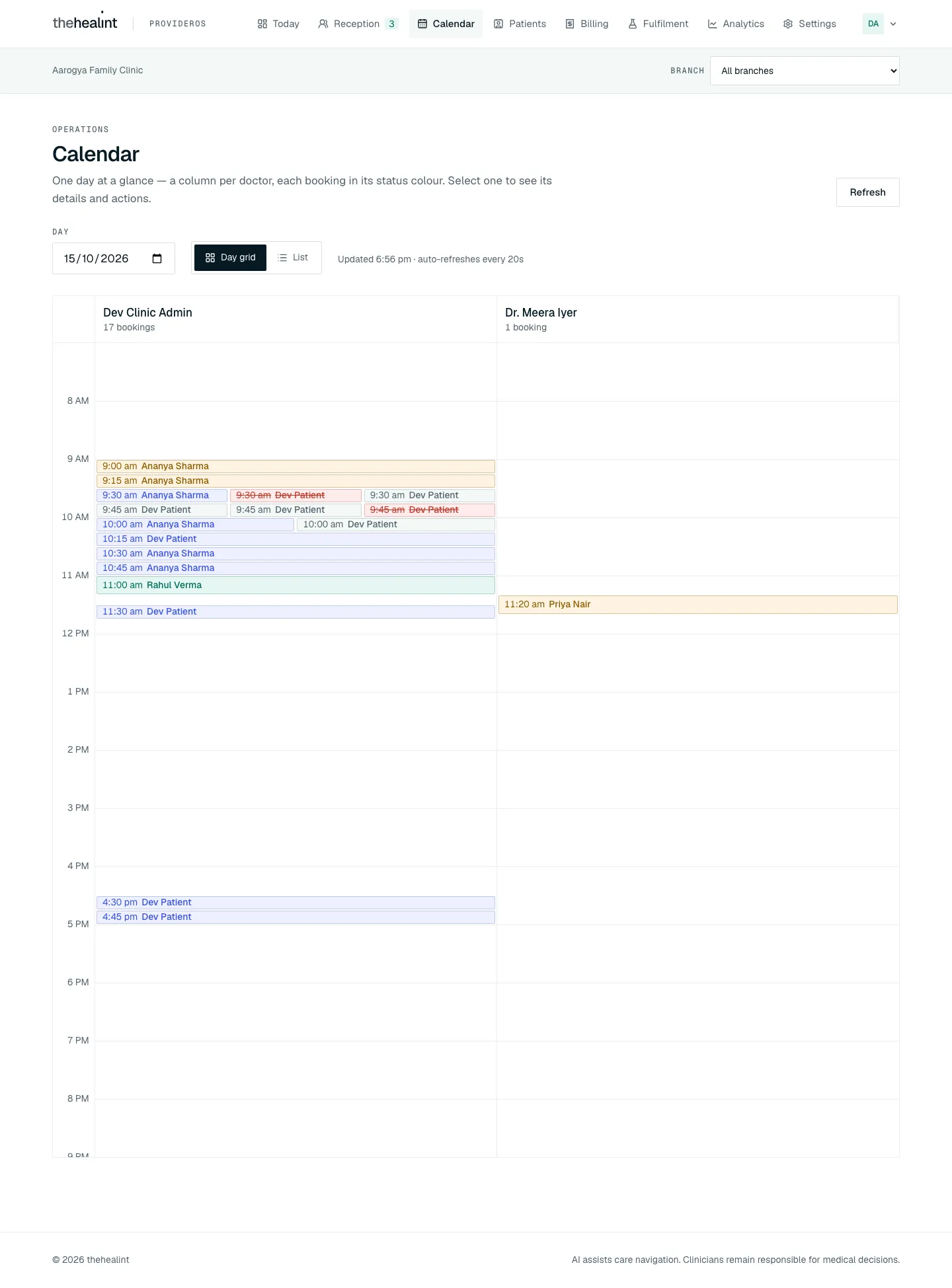
- Calendar → Day picker (default today) →
GET /api/v1/booking/appointments/tenant?fromDate=…&days=1(plus the selected branch). - One column per doctor, headed with the name and "n bookings". Each booking is a block at its time, coloured by status, reading "time patient". Hovering shows "start–end · patient · status".
- Clicking a block opens the appointment drawer (§4c), which carries the actions.
- Empty: "No appointments on this day — Choose another day, or register a walk-in from Reception."

4b. List#
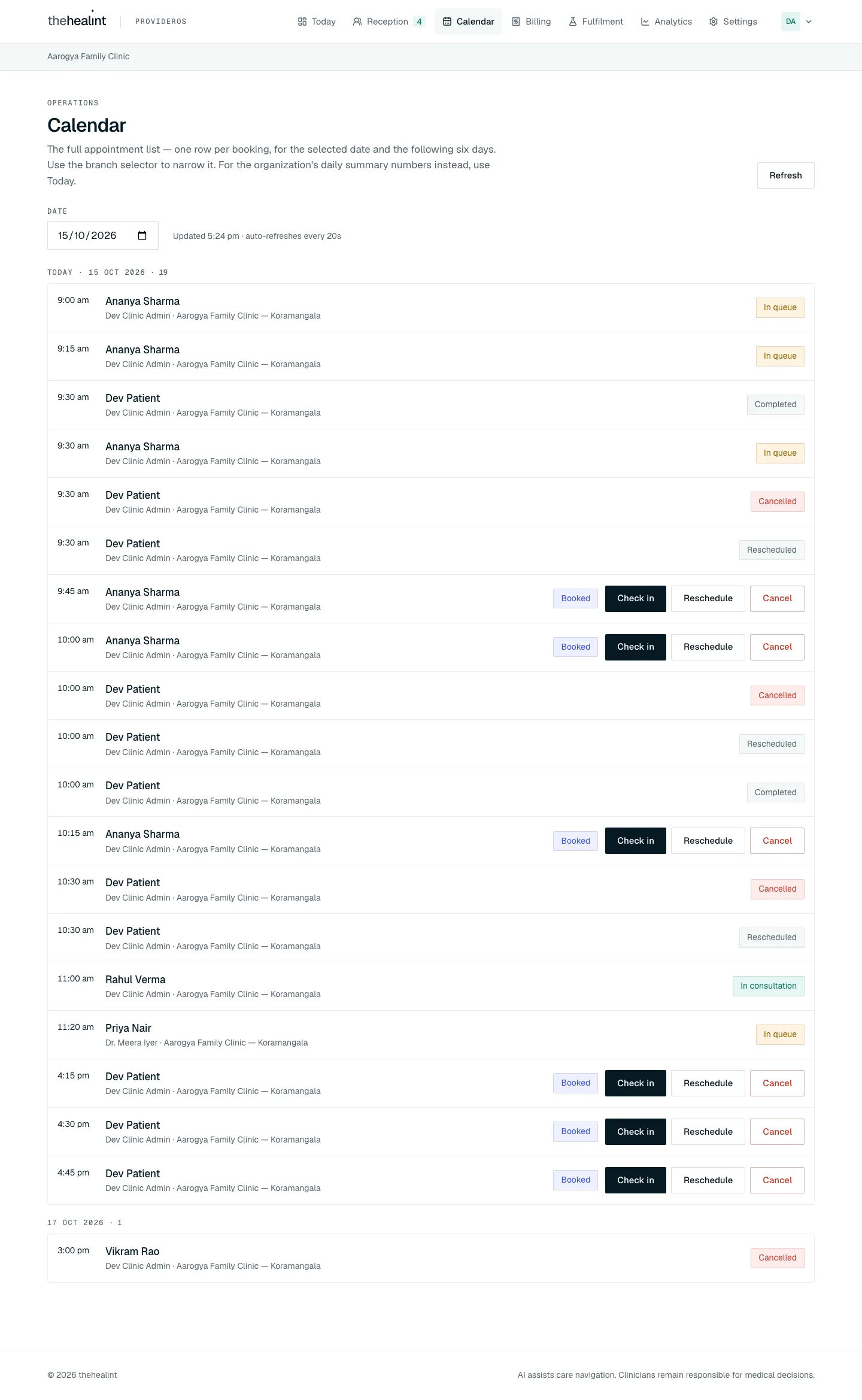
- List → a From date →
GET /api/v1/booking/appointments/tenant?fromDate=…&days=7(plus the selected branch). - Results are grouped by day (India time). Each group heading reads "Today · date" or the date, followed by "· count".
- Each row: time, patient name (opens the drawer), doctor · branch, status pill, and actions.
- Both views auto-refresh every 20 seconds. The caption reads "Updated time · auto-refreshes every 20s". Refresh forces it.
- Loading: "Loading the calendar…". Empty: "No appointments in this seven-day window. Choose another starting date, or register a walk-in from Reception."
- If a refresh fails after a good load: "error Showing the last successful load." with Retry.
- Status pills (sentence case): Held, Booked, Confirmed, Checked in, In queue, In consultation, Completed, Cancelled, Expired, Rescheduled, No show.
- Check in appears on a row only if it is today's and still Booked/Confirmed. Reschedule and Cancel appear on any Booked/Confirmed row. All three are shown only to front-desk roles and admins; a doctor's calendar is read-only.
4c. Appointment drawer#
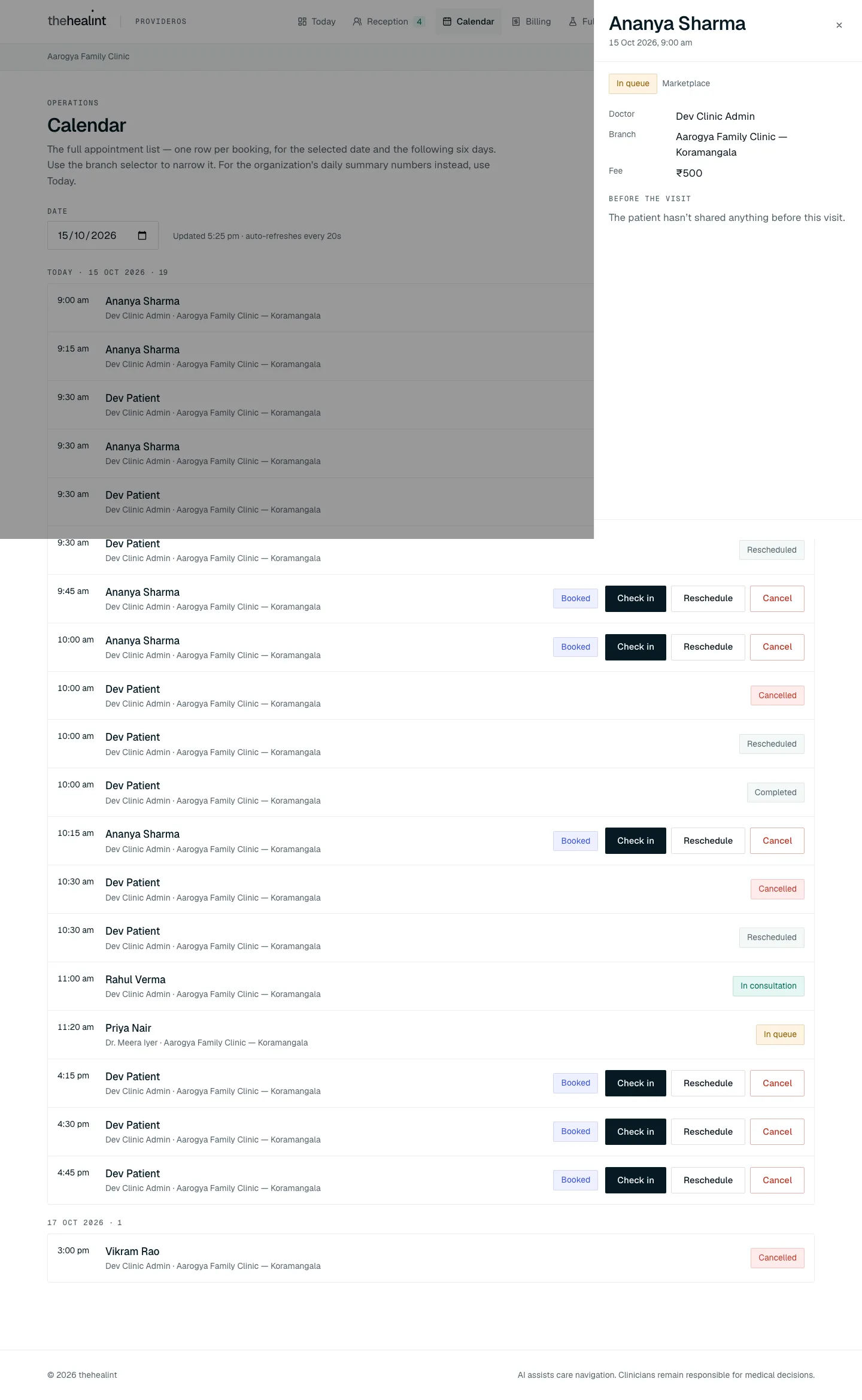
- Click a patient name or a grid block (on Calendar, Reception's Expected list or a patient's page) → a side drawer opens. Its title is the patient's name and its subtitle the date and time.
- It shows: the status pill and booking source ("Marketplace", "Link", "Staff", "Walk in", "Follow up" or "Admin"), Doctor, Branch, Fee (₹), and Reason if cancelled.
- Before the visit → the system calls
GET /api/v1/appointments/:id/pre-visit:- The API answers only the treating doctor: the doctor the appointment is booked with, or a colleague who opened it as cover with a reason. Every front-desk role, admin and other doctor gets a 403, and the drawer says "Only the treating doctor can see what the patient shared before the visit."
- For the treating doctor it shows Symptoms / Current medicines / Allergies, or "The patient hasn't shared anything before this visit."
- History → a timeline of every status change, with time and reason (
GET /api/v1/booking/appointments/:id/history). - Footer actions: Open consultation (if In consultation), Check in (today, Booked/Confirmed), Reschedule, Cancel. Check in, Reschedule and Cancel are shown only to front-desk roles and admins. After a successful action the drawer closes and the list refreshes.
4d. Reschedule#
- Reschedule → a sheet opens: "Reschedule patient" ("Currently day, time with doctor").
- Date input (any date, not a 14-day strip) →
GET /api/v1/booking/slots?practitionerBranchId=…&fromDate=…&days=1→ the open times for the same doctor at the same branch appear as chips.- Loading: "Loading openings…". Empty: "No openings on this date. They may not consult on this day, or the day is full. Try another date."
- Pick a time → confirm dialog "Move this appointment?" ("Patient moves from old to new. The original booking is closed as rescheduled, its slot is released for someone else, and patient is emailed the new time.") → Move appointment (or Pick another time).
- The system calls
PATCH /api/v1/booking/appointments/:id/reschedule. In one transaction the old booking becomes Rescheduled and a new booking is created. - If someone took the slot first, the server answers with three alternatives. These show under "Still free right now" together with the error.
- Notification: email
appointment.rescheduledto the patient. - Changing the doctor or branch is not possible from this sheet.
4e. Cancel#
- Cancel → dialog "Cancel this appointment?" ("The slot is released for someone else and patient is emailed that it was cancelled. This cannot be undone…"), with an optional Reason field (up to 500 characters, "Stored on the appointment and included in the email").
- Cancel appointment (or Keep it) →
PATCH /api/v1/booking/appointments/:id/cancel→ status Cancelled, reason saved. - Notification: email
appointment.cancelledto the patient. - Only Booked and Confirmed bookings can be cancelled or rescheduled from the screen. The API also accepts Held, but the UI deliberately hides it.
5. Patients directory (ProviderOS /patients)#
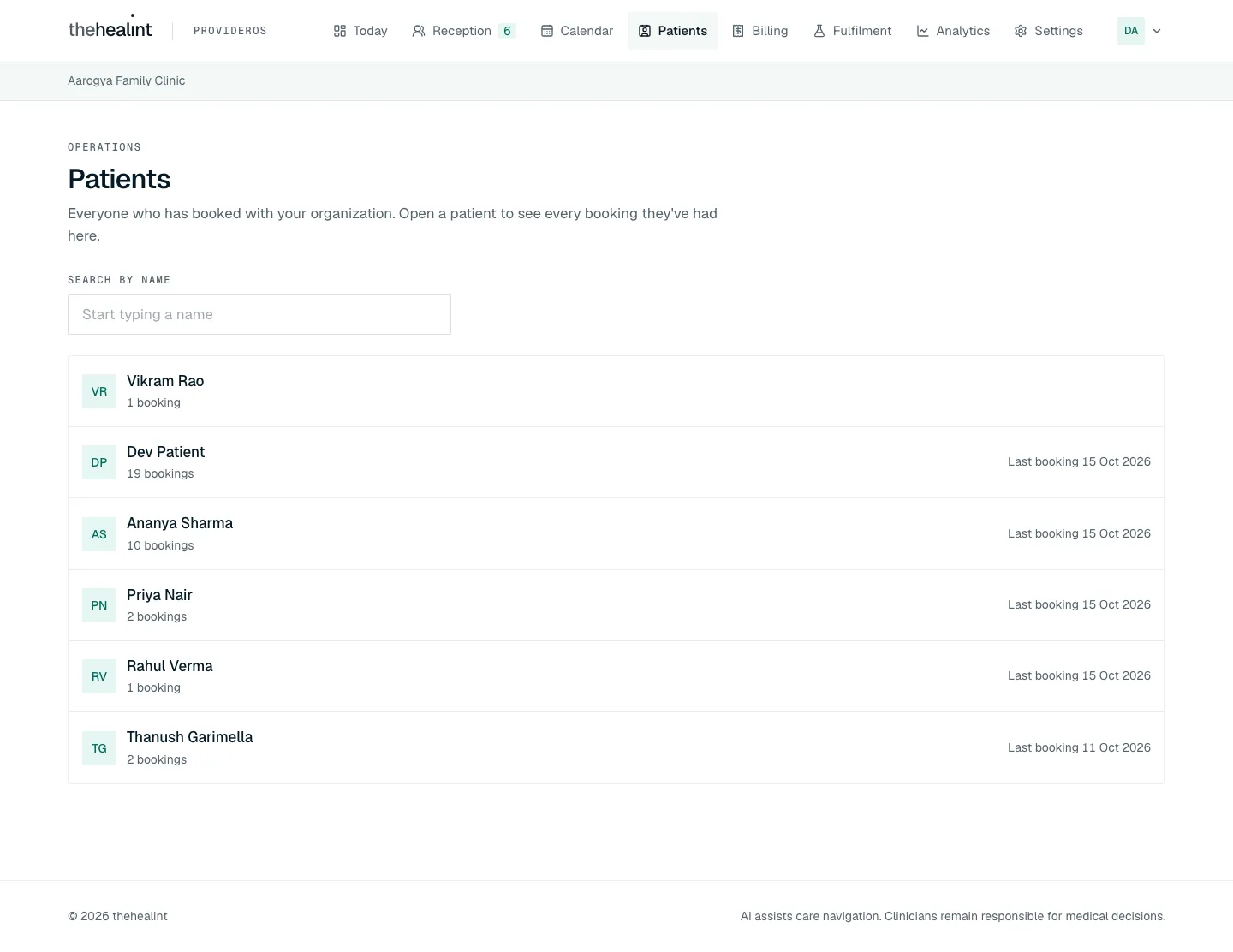
- Patients → "Everyone who has booked with your organization." →
GET /api/v1/booking/appointments/tenant/patients(optionalq). - Search by name → filters as you type (after a short pause).
- Each row: avatar, name, "N booking(s)", "Next date" and "Last booking date".
- Loading: "Loading patients…". Empty: "No patients yet. Patients appear here after their first booking." No match: "No patients match 'q'".
- The list stops at 200: "Showing the first 200 — search by name to narrow the list."
- Names only. No phone or email is shown.
- Click a patient →
/patients/[profileId].
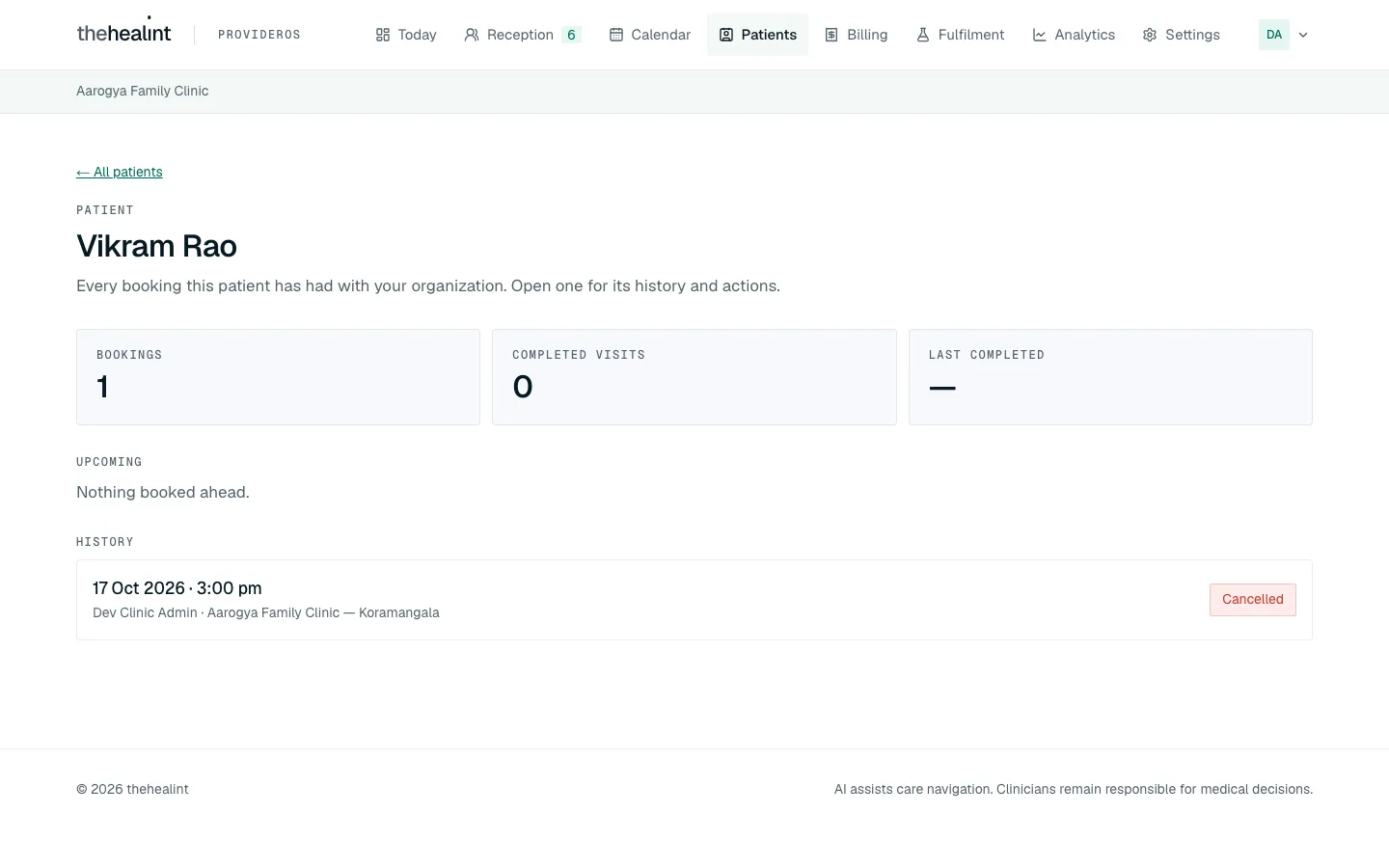
- Patient page → "← All patients" link, name, and tiles Bookings, Completed visits, Last completed.
- Upcoming (Booked, Confirmed, Checked in, In queue, In consultation) or "Nothing booked ahead."
- History (everything else) or "Nothing here yet — completed, cancelled and missed visits appear here."
- Click any visit → the same appointment drawer (§4c), with check-in, reschedule and cancel where allowed.
- A patient with no booking here gets "No bookings with your organization". An id from another organization reveals nothing.
6. Billing (ProviderOS /billing)#
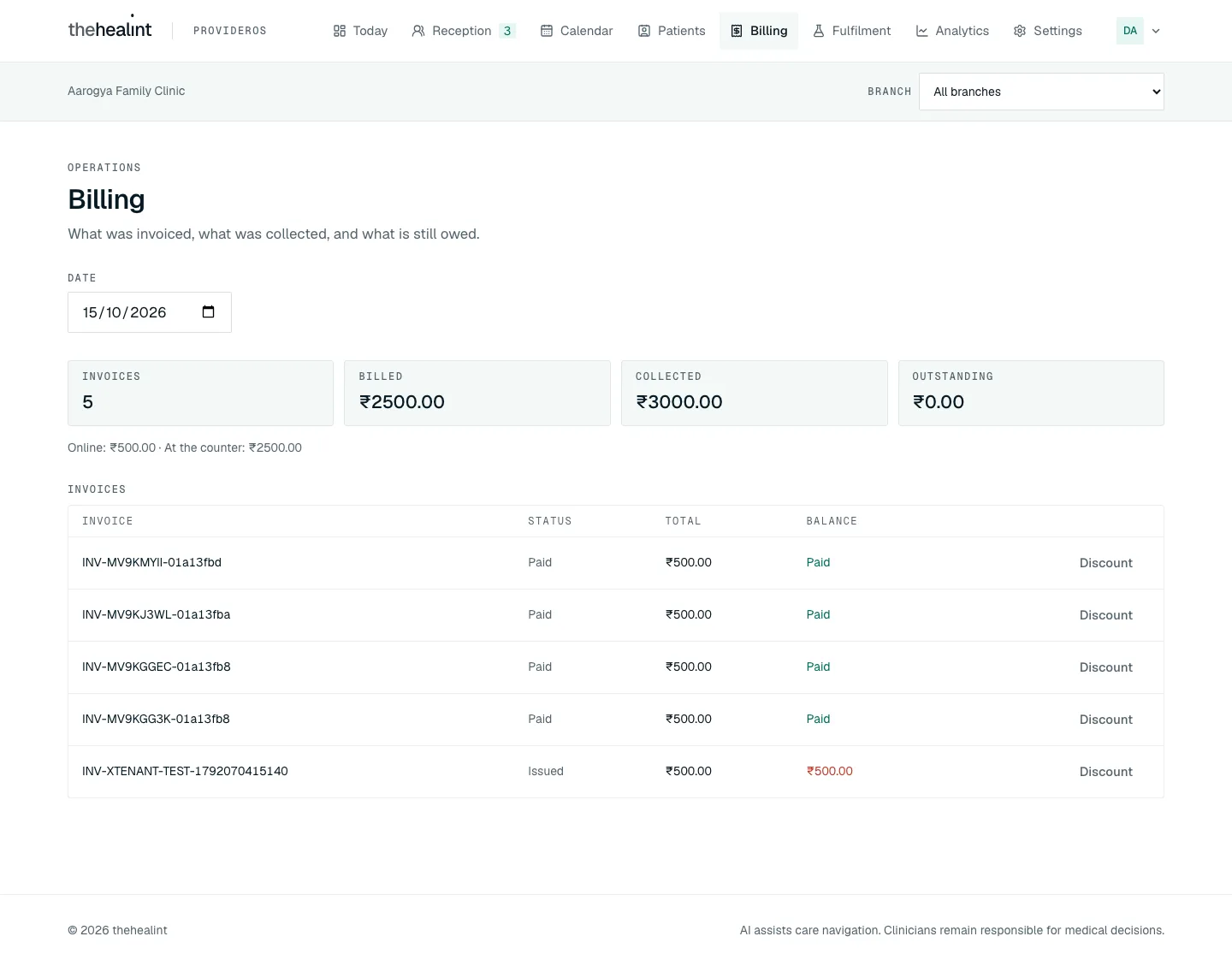
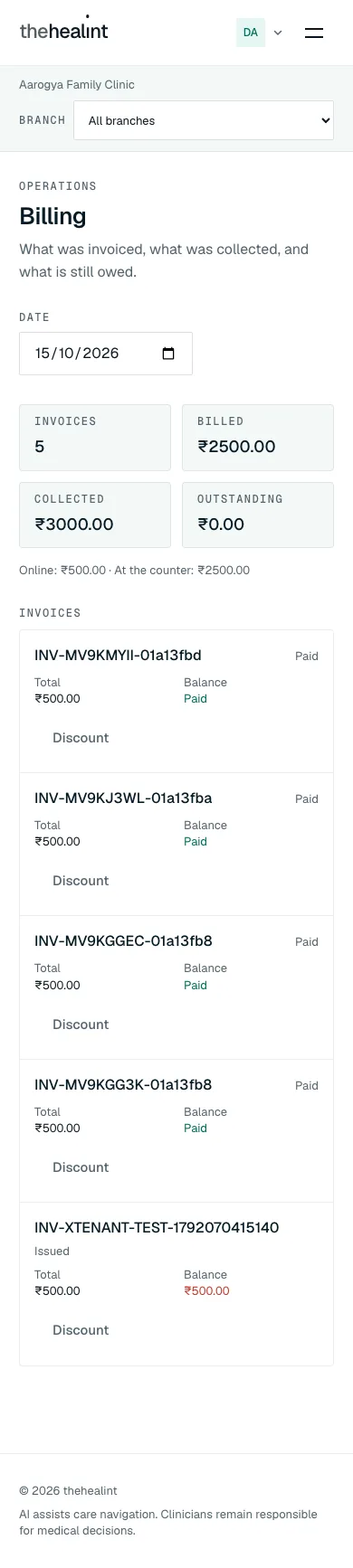
- Billing → "What was invoiced, what was collected, and what is still owed." → a Date picker (default today) →
GET /api/v1/billing/tenant/summary?date=…andGET /api/v1/billing/tenant/invoices?date=….- Loading: "Loading the day's billing…". Error with Retry.
- Tiles: Invoices, Billed, Collected, Outstanding. Below them, a split by payment method, listing only the methods used that day, for example "Online: ₹… · At the counter: ₹…" (the screenshot shows "Online: ₹500.00 · At the counter: ₹2500.00").
- Invoices table (one card per invoice at phone width): Invoice number, Status, Total, Balance (red amount, or "Paid").
- Invoice statuses (sentence case): Draft, Issued, Paid, Void.
- Empty: "No invoices on this day. An invoice is raised when a consultation is billed…"
- Record collection appears only for a pay-at-the-counter payment that is still pending → dialog "Record this payment as collected?" ("Confirms that ₹X was taken at the counter for INV… The invoice is settled… Recording this by mistake can only be undone with a refund, so take the money first.") → Yes, money received / Not yet →
PATCH /api/v1/payments/:paymentId/collect.- The invoice settles and counts toward the day's Collected.
- Notification: email
payment.collected_at_facilityto the patient.
- Discount (on any invoice that is not Void) → a form appears under the table: Amount (₹) and Reason ("Recorded against the invoice for audit") → Apply discount → confirm "Apply this discount?" ("₹X comes off INV…, leaving ₹Y due. Discounts are recorded permanently and cannot be reversed from here.") →
POST /api/v1/invoices/:id/discount. The server recomputes the total.- Validation: "Enter a valid discount amount." / "Give a reason for the discount."
- Billing is organization-wide. The branch selector does not filter it.
Role × capability#
The "API rule" column comes from role_permissions in supabase/migrations (Appointment manager copies every Receptionist grant, 20261028000001) and from StaffScopeService for the calendar, patients and queue lists. The role columns say what the ProviderOS screens offer that role today.
| Capability | API rule | Receptionist | Appointment manager | Nurse | Billing | Clinic / Hospital admin | Facility manager |
|---|---|---|---|---|---|---|---|
| Sign in to ProviderOS web | any active staff role | Yes | Yes | Yes | Yes | Yes | Yes |
| First screen after sign-in | lib/access.ts | Reception | Reception | Reception | Billing | Today | Today |
| See today's queue, call / start / skip / no-show | queue.manage | Yes | Yes | Yes (queue only) | No | Yes | Yes |
| Today summary tiles | queue.manage | No screen (API yes) | No screen (API yes) | No screen (API yes) | No | Yes | Yes |
| Expected today, check-in | front-desk role (screen); any member (API) | Yes | Yes | No | No | Yes | Yes |
| Search patients for a walk-in | patient.demographics.read | Yes | Yes | No screen (API yes) | No | Yes | Yes |
| Register a new patient / add a dependent | patient.register | Yes | Yes | No | No | Yes | Yes |
| Create a walk-in | queue.manage | Yes | Yes | No screen (API yes) | No | Yes | Yes |
| Calendar and patients directory (whole clinic) | patient.register → whole clinic; doctor → own; others refused | Yes | Yes | Refused (403) | Refused (403) | Yes | Yes |
| Reschedule, cancel | front-desk role (screen); any member (API) | Yes | Yes | No | No | Yes | Yes |
| Billing list, summary, record collection, discount, refund | billing.manage | Yes (no refund button) | Yes (no refund button) | No | Yes (no refund button) | Yes | Yes |
| Open a consultation | encounter.manage (doctors), and the consultations screen | No | No | No | No | No (unless also Doctor) | No |
| Read pre-visit clinical notes in the drawer | treating doctor only | No | No | No | No | No | No |
| Read health records | health_record.read | No | No | API yes, no screen | No | No | No |
| Manage staff | staff.manage | No | No | No | No | Yes | No |
Permissions & privacy#
- Each role sees its own work. ProviderOS's menu, landing page and route gate follow
lib/access.ts. The API enforces the same split on the data: the calendar (GET /api/v1/booking/appointments/tenant) and the patients directory return the whole organization to anyone holdingpatient.register(front desk and admins), only the doctor's own bookings to a doctor without a front-desk role, and 403 "Your role does not include the calendar." (or "…the patient directory.") to everyone else, including Nurse and Billing. The queue (GET /api/v1/queue) returns the whole organization to front desk and nurses, and only their own tokens to doctors. - Organization scoping. Every list (calendar, queue, patients, billing) is limited to the signed-in user's organization by the API and by row-level security. Opening a patient id from another organization returns "not found".
- Patients directory shows names only. No contact details are shown. Patient search for walk-ins does return phone and email, and needs
patient.demographics.read. - Clinical notes stay with the treating doctor. The drawer's "Before the visit" section asks the API, which answers only the appointment's own doctor or a colleague who covered it with a reason. Everyone else, front desk and admins included, gets a 403, and the screen says only the treating doctor can see it.
- Acting for a patient is front-desk only in the API too. Check-in, reschedule and cancel act for a patient only when the caller can register patients (front desk and admins); for anyone else — a doctor, nurse, billing or pharmacy account — they reach only that person's own appointments.
- Audit. Walk-in, check-in, reschedule, cancel and discount endpoints are marked as audited record edits. Invoice reads are audited views. Write actions carry an idempotency key, so a double-click doesn't double-act.
- Two-factor. ProviderOS enforces the authenticator challenge for enrolled accounts. Since every front-desk role now works in ProviderOS, every one of them can enrol (account menu → Security) and is challenged once enrolled.
Gaps & known limitations#
Front-desk roles could not open the front-desk screens— fixed: ProviderOS admits every staff role, each with its own menu.The Billing role had no working screen— fixed: Billing lands on ProviderOS Billing.The User-web Work page lacked a branch filter, live updates and Skip / No-show— that page is gone; staff use ProviderOS Reception.Start/Open consultation shown to non-doctors— fixed: only accounts with the Doctor role see them; the desk calls and skips, and sees the token move when the doctor starts.Calendar actions not gated in the API— fixed: see Permissions & privacy.- Demo credentials may disagree with the code.
docs/DEMO_CREDENTIALS.mdlistsreception@…under "ProviderOS web / APK". Web now works; the standalone ProviderOS mobile APK still turns the account away (the User app is the one that works, gap 13). - Walk-in doctor picker shows ids, not names. Options read "Practitioner 1a2b3c4d · ₹500".
- No queue notifications. Calling a token, check-in and walk-in send nothing to the patient. Only cancel, reschedule and payment events send emails.
- Cancellation email is thin. The cancellation email is queued with an empty practitioner name and the raw start timestamp.
- Not available in the UI. There is no refund button (the API
PATCH /payments/:id/refundexists), no void-invoice button, and no settlement view. A booking cannot be moved to another doctor or branch. - No branch filter on Billing and Today. Both are organization-wide even when a branch is selected.
- Sign-in copy mentions codes. The ProviderOS sign-in offers email + password only. Older copy and comments still refer to "sign-in code" / email OTP.
- Little front-desk work on iPhone. In the User app, Receptionist and Appointment manager get only a read-only Calendar tab; Nurse and Billing get a pointer to the web. There are no reception, check-in or queue screens. The standalone ProviderOS mobile app now admits them too, with the same role-based home screen.
No screenshot of Reception— added (receptionist view). There is still no capture of the Nurse's queue-only variant, the Skip / No-show dialogs, or the reschedule and cancel dialogs.
Related#
- 01-patient.md: how patients book, check themselves in and pay
- 02-doctor.md: the consultation that a Called / In consultation token opens
- 04-clinic-admin.md: branches, doctors, schedules and the admin view of these same screens
- 05-pharmacy-lab.md: fulfilment of prescriptions and lab orders
- 06-platform-admin.md: verification, plans and platform support
Region (added Oct 2026)#
Check-in opens on the appointment's day on the clinic's calendar; the walk-in's slot search, the queue's "today" and the Calendar's day grouping use the same clock. Fees on Reception and Billing use the clinic's currency. A platform administrator sets the region on the organization's detail page in Admin web.
PDF version
The same guide with all its screenshots, to print or share. (0.7 MB)
Download the PDF Open in a new tab
Loading the PDF viewer… If it does not appear, your browser cannot show PDFs inside a page: use Download the PDF.