Platform admin flows
Who this is for#
This document covers thehealint's own staff, who run the platform rather than a clinic. There are two roles:
- Platform admin (
PLATFORM_ADMIN). Can do everything described here. - Platform support (
PLATFORM_SUPPORT). Has a narrower set of permissions.
It covers signing in, the Work inbox, organization verification, pharmacy and lab verification, the organization detail page ("Tenant 360"), operations and reliability dashboards, review moderation, support tickets, plans, reference data, the knowledge base, consent versions, the audit log and account security. A short final section covers the marketing site's (hi-home) submissions review. It is written for product, QA and new team members.
Where they work#
| Surface | What it is for |
|---|---|
Admin web (apps/admin-web) | The private Platform Admin portal. The top menu has Overview, Verification, Pharmacy & labs, Reviews, Support, Operations, Content and Plans. The All sections list on Overview also links Product funnel (/analytics), Reliability (/reliability), Knowledge base (/knowledge-base), Consent versions (/consent) and Audit log (/audit). Plans, Consent versions, Audit log and Your security share a sub-menu. The account menu has Your security (/security) and Sign out. |
hi-home /protected | A separate marketing site where a marketing admin reviews contact enquiries and job applications (see the last section). |
At a glance#
| Journey | Where | Outcome |
|---|---|---|
| 1. Sign in and two-factor check | Admin web sign-in | Signed in to the Work inbox, or sent to the right app if the account is not platform staff |
| 2. Set up two-factor authentication | Your security (/security) | An authenticator app is enrolled; later sign-ins ask for a code |
| 3. Triage the Work inbox | Overview (/) | See every queue's count and the oldest waiting items |
| 4. Verify an organization | Verification (/verification, one organization at /verification?tenant=<id>) | Organization Verified or Rejected, with notes in its history; its clinic admins are emailed |
| 5. Verify a pharmacy, lab or professional | Pharmacy & labs (/fulfillment) | Verified, Rejected or Suspended, with a required note |
| 6. Look up an organization (Tenant 360) | Operations → provider → /tenants/[id] | One read-only page with verification, documents, branches, plan, facilities, tickets and appointments |
| 7. Check platform health | Operations (/ops), Product funnel (/analytics), Reliability (/reliability) | Payments, patient counts, providers, appointments, funnel, SLOs and alerts |
| 8. Moderate reviews | Reviews (/reviews) | A review is Published or Hidden (with a reason) |
| 9. Answer support tickets | Support (/support) | Reply, then move the ticket Open → In progress → Resolved → Closed |
| 10. Manage plans | Plans (/subscriptions) | An organization is assigned or moved to a plan |
| 11. Maintain reference data and knowledge base | Content (/content), Knowledge base (/knowledge-base) | Vocabularies and care-navigation articles updated |
| 12. Publish a consent version | Consent versions (/consent) | A new consent text version becomes active |
| 13. Read the audit log | Audit log (/audit) | Who opened, downloaded or changed which record, in which organization, and when |
| 14. Review marketing submissions | hi-home /protected | Read enquiries and applications; replay failed deliveries |
Journey 1: Sign in and two-factor check#
- Admin web → "Platform admin" sign-in card. The card reads "Use your email and password." The user enters their email and password and signs in. There is no single sign-on and no self sign-up.
- The system checks two-factor status. If the account has an authenticator enrolled and this session has not passed it yet, the "Two-factor check" screen appears: "Enter the six-digit code from your authenticator app." The user enters the code in Authenticator code and clicks Verify (shown as "Verifying…" while working). A wrong code shows its error under the field. A Sign out link is also offered.
- The API enforces the same rule: once an account has enrolled, any request from a session that has not passed the code check gets 403.
- If the account has not enrolled, no code is asked for. See Journey 2 and Gaps.
- Profile check. The system loads
GET /api/v1/me. If the account has no profile yet, a "One last thing" screen asks for a Full name. - Role check. Only accounts whose platform role is
PLATFORM_ADMINorPLATFORM_SUPPORTare let in. Anyone else sees "This is the private Platform Admin portal", with "Your account belongs in ProviderOS Admin" (or "...the User workspace"), an Open ProviderOS / Open User web button, and Sign out. - What the user sees next. The Work inbox (Journey 3).
Journey 2: Set up two-factor authentication#
- Account menu → Your security → "Two-factor authentication". Lead text: "Platform admin accounts can review and manage every tenant's data — require a code from an authenticator app in addition to your sign-in code."
- With no authenticator. The empty state reads "No authenticator on this account.", with the hint "Until one is enrolled, your sign-in code alone unlocks every tenant's data." The user clicks Set up two-factor authentication.
- Enrol. The page shows a QR code and a manual key: "Scan this QR code with your authenticator app, or enter the key manually." The user enters the six-digit code and clicks Confirm ("Verifying…" while working). Cancel abandons the setup.
- Result. The authenticator is listed as "Authenticator app · Added
", with a Remove button. Removing it asks to confirm in a "Remove this authenticator?" dialog, whose button is Remove authenticator.
Journey 3: Triage the Work inbox#
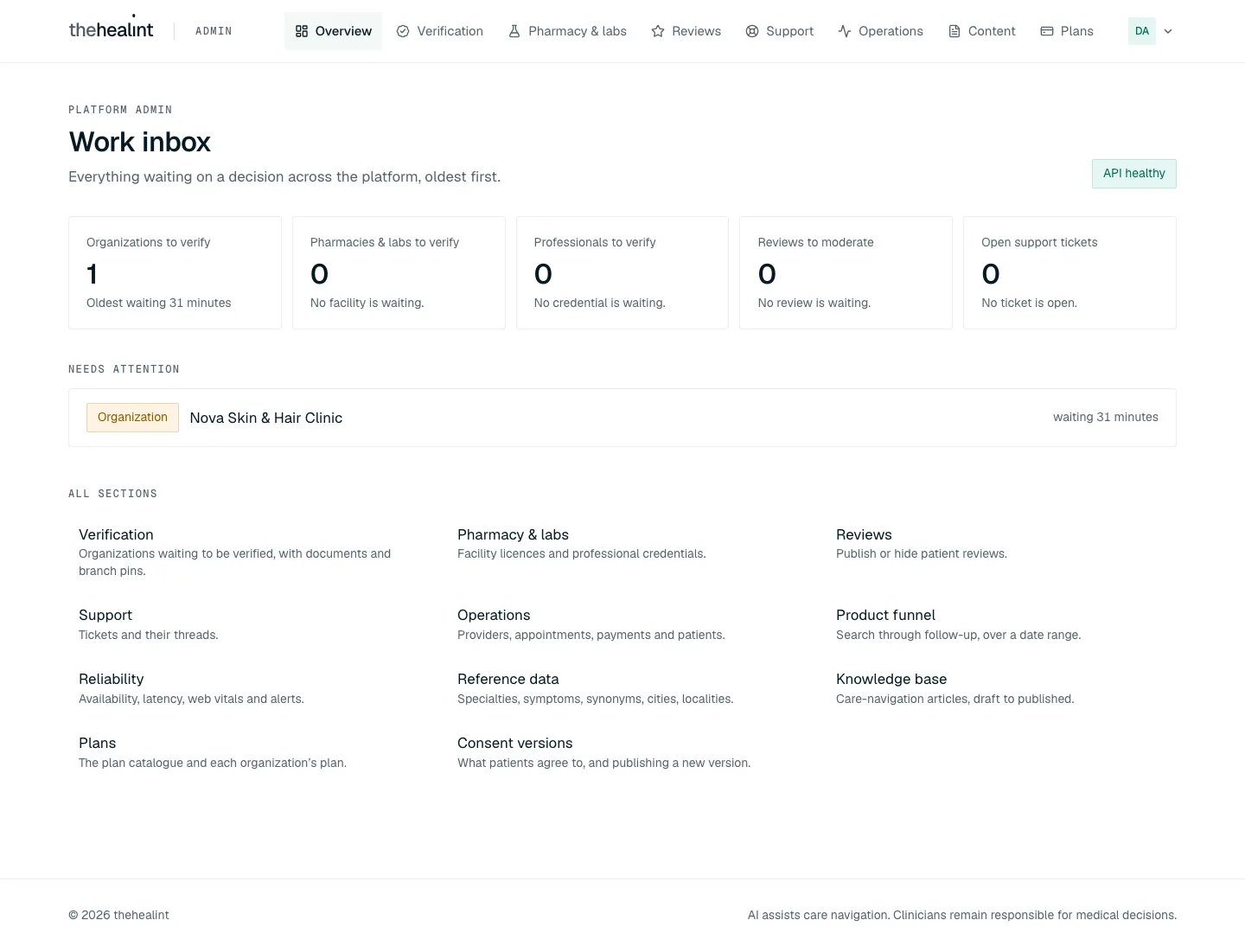

Overview → "Work inbox" (eyebrow "Platform admin"). Lead text: "Everything waiting on a decision across the platform, oldest first." A pill on the right shows the API status: API checking…, API healthy or API unreachable.
Five lane cards. Each lane loads on its own, so one failing does not blank the others. Each card shows a count and "Oldest waiting
Lane Source Counts Empty message Opens Organizations to verify GET /api/v1/admin/tenants/pending-reviewAll pending No organization is waiting. /verificationPharmacies & labs to verify GET /api/v1/admin/fulfillment/facilitiesAwaiting review No facility is waiting. /fulfillmentProfessionals to verify GET /api/v1/admin/fulfillment/credentialsAwaiting review No credential is waiting. /fulfillmentReviews to moderate GET /api/v1/reviews/moderation-queuePending No review is waiting. /reviewsOpen support tickets GET /api/v1/support/ticketsOpen or in progress No ticket is open. /support- A lane the account isn't allowed to see shows "Your account can't see this queue." This is what platform support sees on the verification lanes.
- Any other failure shows "Couldn't load this queue."
"Needs attention" list. The 12 oldest items across all lanes, each with a type pill (Organization, Facility, Professional, Review, Ticket), a name, and "waiting
- While loading: "Checking every queue…".
- When everything is clear: "Nothing is waiting on a decision."
"All sections". Links with one-line descriptions to every admin area, including ones not in the top menu.
Journey 4: Verify an organization#
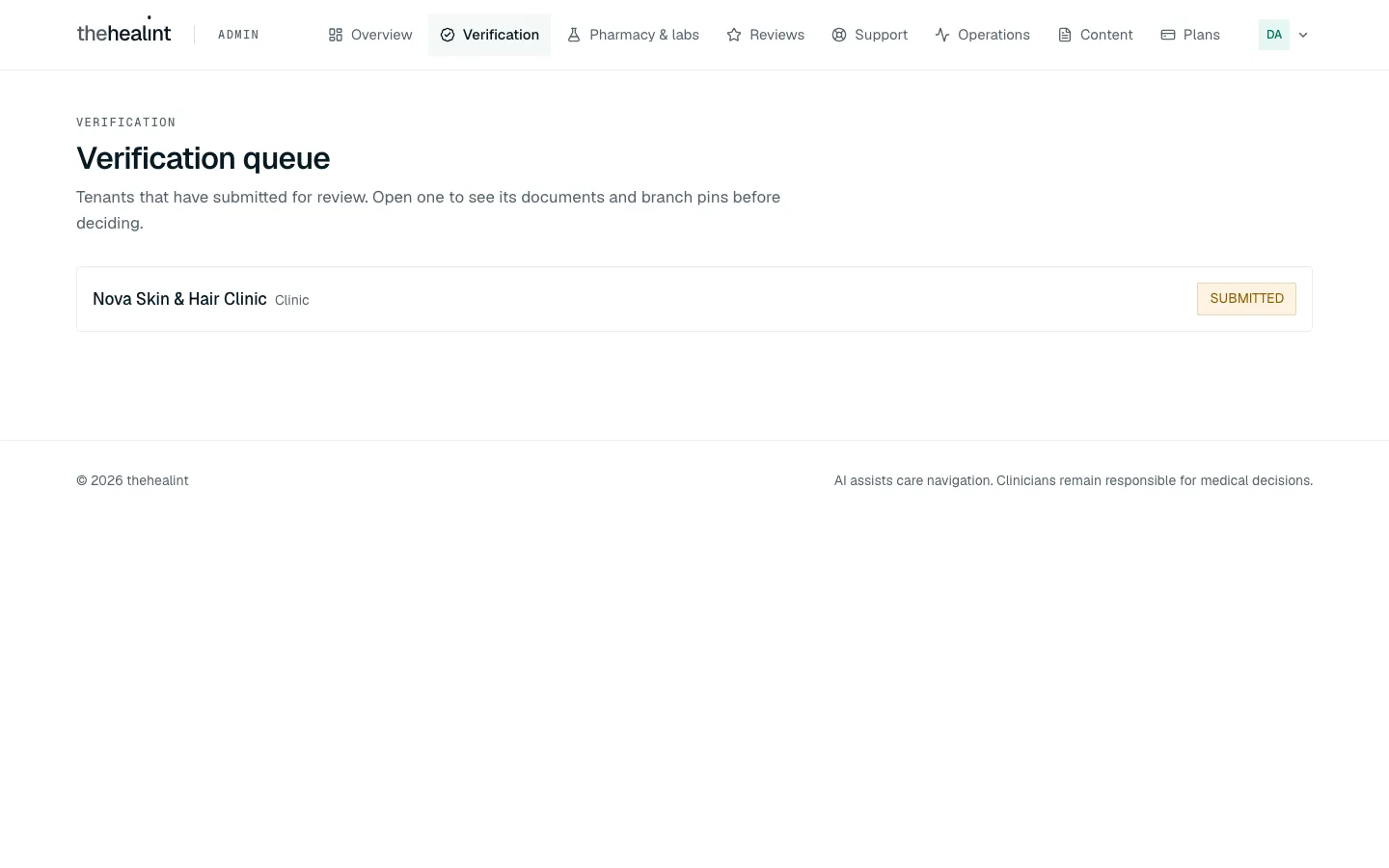
- Verification → "Verification queue". Lead text: "Tenants that have submitted for review. Open one to see its documents and branch pins before deciding." Each row shows the display name, the organization type, and a status pill: Awaiting review, Under review, Verified or Rejected.
- Empty: "Nothing is waiting for review.", with the hint "Tenants appear here the moment they submit their verification documents."
- Error: "Could not load the verification queue.", with Retry.
- Click an organization. It opens at
/verification?tenant=<id>. The address is a deep link: the Work inbox and Tenant 360's Review button open an organization directly, and the browser's Back returns to the queue. Links at the top: Tenant 360 and ← Back to queue. While loading: "Loading this organization…".
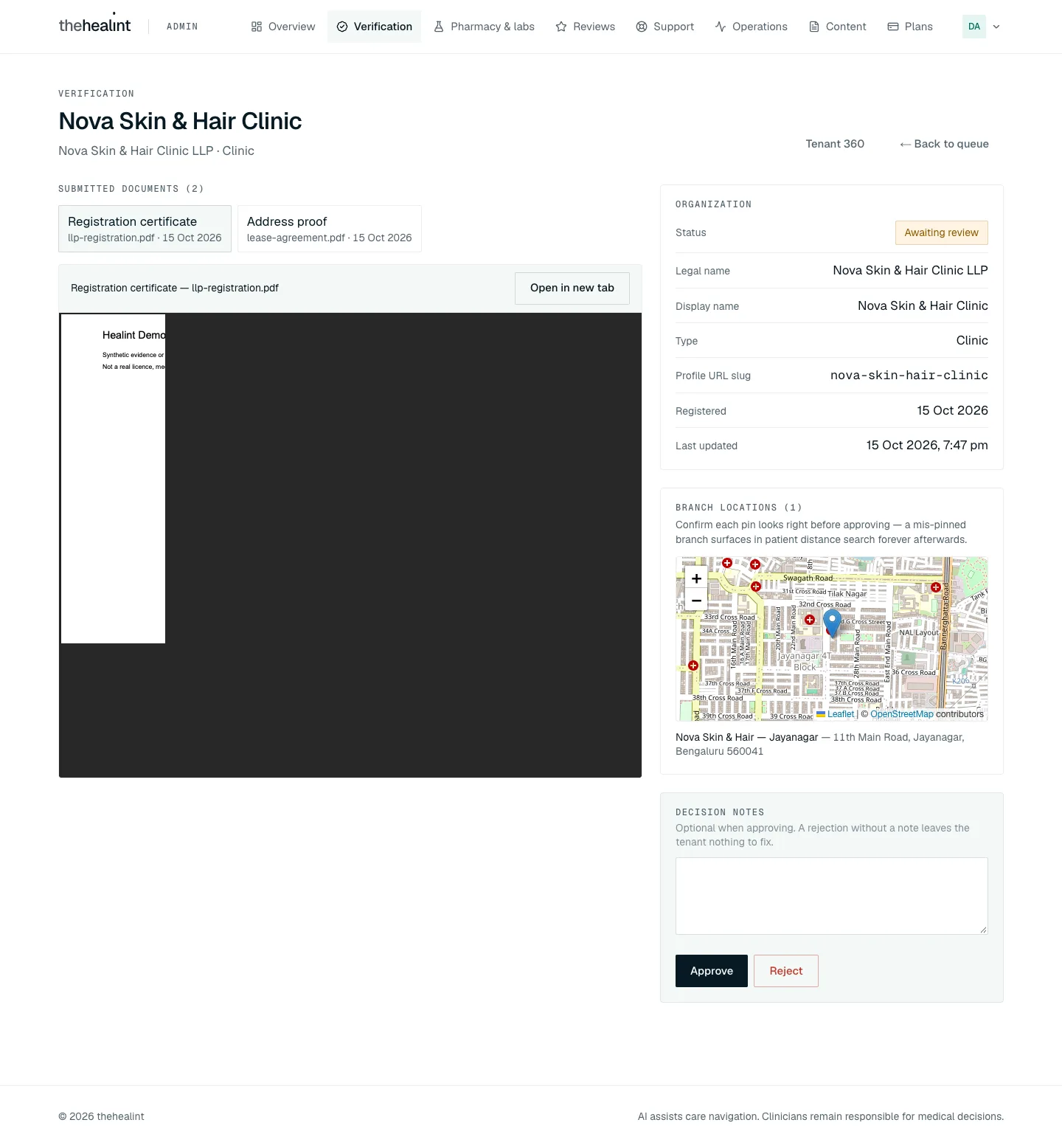
- Left: the documents. Each document is a tab ("type" and "file · date"). The selected one opens inline: PDFs and images are previewed in the page; other types say "This file type can't be previewed here. Open it in a new tab to check it before deciding." Open in new tab is always offered. Each document opens from a short-lived signed link.
- No documents: "No documents uploaded yet.", with a hint advising rejection with a note rather than approval.
- Right: the facts and the decision.
- Organization: Status, Legal name, Display name, Type, Profile URL slug, Registered, Last updated.
- Branch locations (n): "Confirm each pin looks right before approving — a mis-pinned branch surfaces in patient distance search forever afterwards.", a map and each branch's address. If there are none: "This tenant has pinned no branches.", with the hint "A verified tenant with no branch cannot be found in patient search at all — worth asking about before approving."
- Decision notes ("Optional when approving. A rejection without a note leaves the tenant nothing to fix.") → Approve or Reject. Once decided, this card instead reads "No decision is pending — this organization is status." with a link to Tenant 360.
- Confirm dialogs:
- Approve — "Approve name?": "Name becomes verified and its clinic admins are emailed. Its branches appear in patient search once the organization publishes itself from ProviderOS." Button: Approve.
- Reject — "Reject name?": "Their clinic admins are emailed that the application was not approved, with your note as what to fix." Without a note it says only "…was not approved." and warns "You have not written a note, so they will not know what to fix." Button: Reject application.
- What the system does.
PATCH /api/v1/admin/tenants/:id/reviewrecords the decision and notes in the organization's verification history. For Verified or Rejected, in the same transaction it queues an email to every active Clinic admin and Hospital admin of the organization:tenant.verified("Organization is verified on thehealint" — publish from ProviderOS, Today → Publish) ortenant.rejected("Organization: verification needs changes" — "What to fix: note", then update documents in ProviderOS and submit again). - What the user sees next. The queue, reloaded. A failure shows "Could not record the decision."
- Rejected organizations can return without support. Their admin uploads a corrected document and calls
PATCH /api/v1/tenants/:id/verification/resubmitfrom Submit for review again. The API requires a document uploaded after the latest rejection, records REJECTED → SUBMITTED, and the unchanged pending-review query returns the organization here and in the Work inbox again.
Journey 5: Verify a pharmacy, lab or professional#
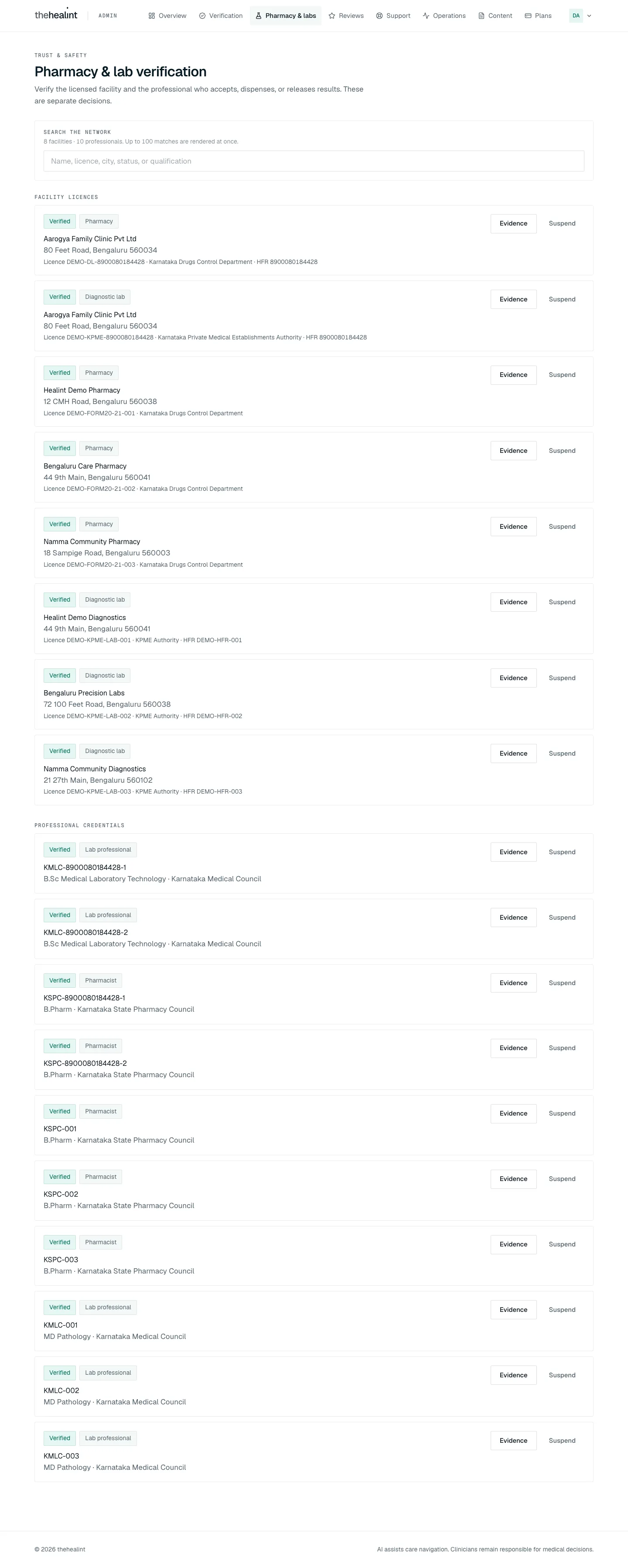
Pharmacy & labs → "Pharmacy & lab verification" (eyebrow "Trust & safety"). Lead text: "Verify the licensed facility and the professional who accepts, dispenses, or releases results. These are separate decisions."
- A Search the network box filters by name, licence, city, status or qualification. Its hint reads "n facilities · m professionals. Up to 100 matches are rendered at once."
- While loading: "Loading pharmacy and lab verification…".
Facility licences. Each card shows:
- A status pill: Draft, Awaiting review, Verified, Rejected or Suspended.
- A Pharmacy or Diagnostic lab tag.
- The legal name, address, and "Licence
· · HFR ".
Evidence lists the uploaded documents, each as type · number · issuer · expiry · file name with an Open button. Open fetches a 5-minute signed link, and every open is audited. If nothing is uploaded: "No evidence uploaded. Do not verify."
Professional credentials. Each card shows a Pharmacist or Lab professional tag, the registration number, and "qualification · council". Evidence opens the registration document.
Decide. Verify and Reject appear only on items awaiting review; Suspend appears only on verified items. A confirmation dialog explains the consequence:
Decision Facility Professional Verify "It appears in patient search and can receive new orders. A current licence document must be on file." "This professional can accept orders and release results at their facility." Reject "It stays out of patient search. The operator can correct it and resubmit." "This professional cannot act on orders. They can submit a corrected credential." Suspend "It leaves patient search and stops receiving new orders immediately. Orders already placed are not cancelled." "This professional can no longer accept orders or release results." The Note for the audit trail is required: the confirm button stays disabled until the note has at least 3 characters. Its hint reads "What you checked and why — this is stored with the decision."
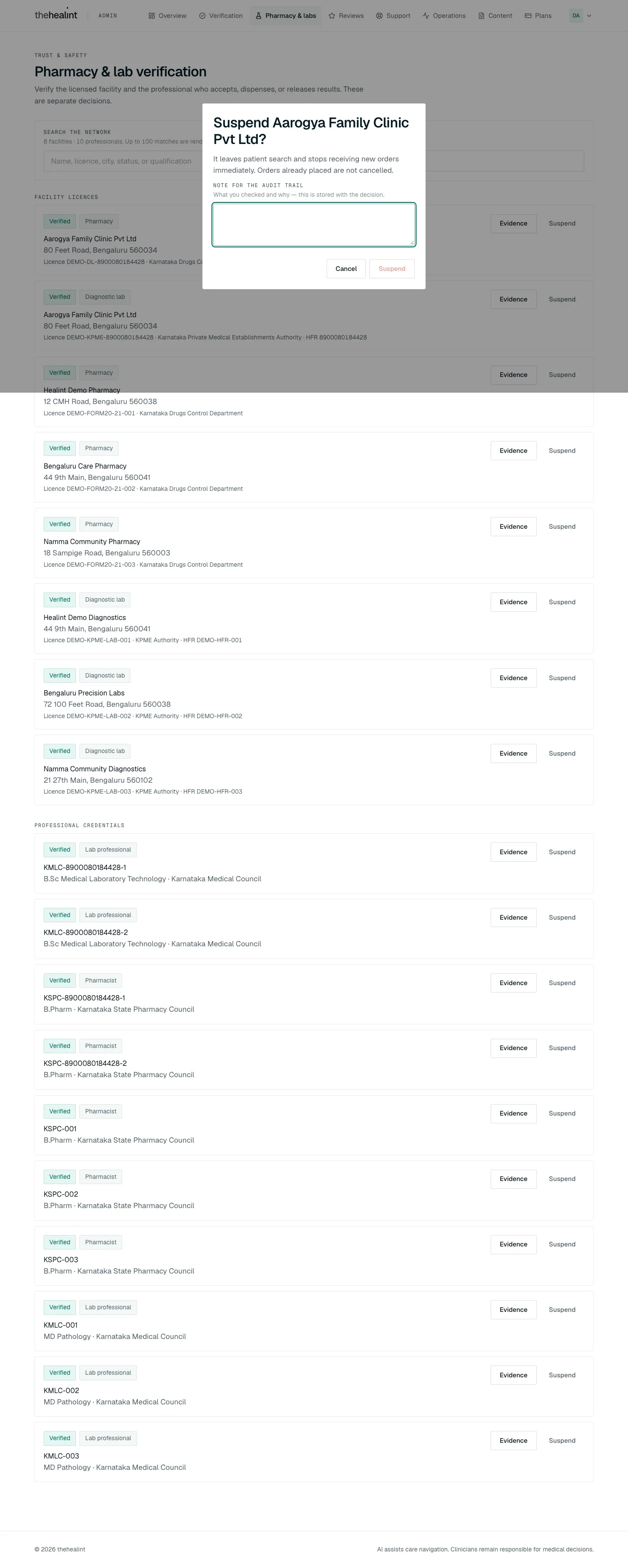
Admin web (desktop) — the Suspend dialog for a facility: what suspending does, the empty "Note for the audit trail" box, and a Suspend button that stays disabled until a note is written. What the system does.
PATCH /api/v1/admin/fulfillment/facilities/:id/review(or/credentials/:id/review) records from-status, to-status, reviewer and note. Verify is refused unless the item was awaiting review and its evidence has not expired.What the user sees next. A toast such as "
verified", and the list reloads. A failure shows "Could not record the facility decision." (or "...credential decision."). See 05-pharmacy-lab.md for the operator's side.
Journey 6: Look up an organization (Tenant 360)#
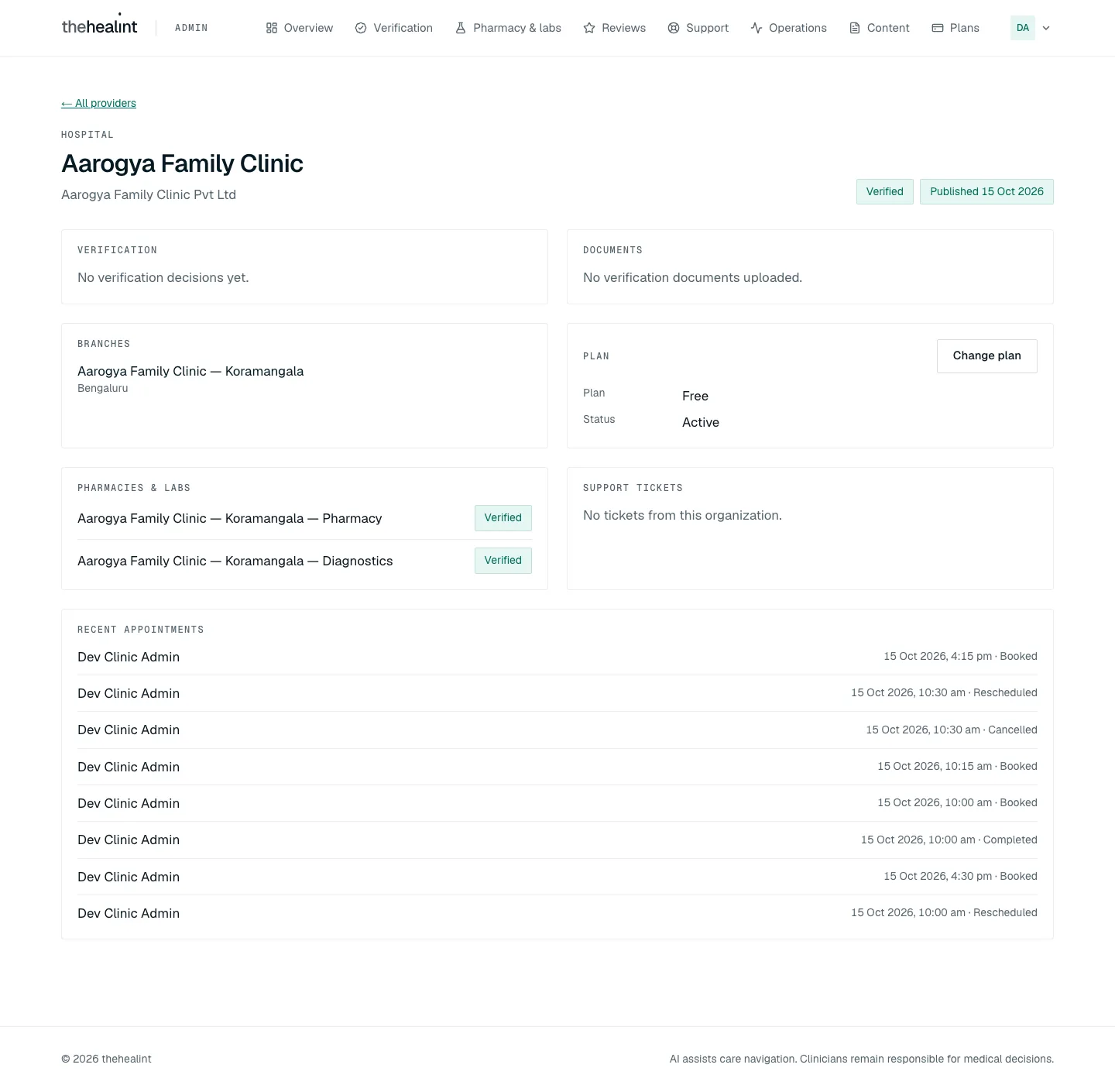
- Operations → Providers list → click a name. This opens
/tenants/[id]. A link at the top reads ← All providers. - Header. The organization type (eyebrow), display name, legal name (when it differs), a verification status pill, and Published
or Not published. - Sections. Each section loads separately. A section the account can't see says "Not available to your account."
- Verification: a timeline of status changes with any notes. A Review button (to
/verification?tenant=<id>, straight to this organization) appears while the organization is submitted or under review. Empty: "No verification decisions yet." - Documents: empty shows "No verification documents uploaded."
- Branches: empty shows "No branches yet."
- Plan: plan, status, and renewal or trial dates, plus a Change plan link (to
/subscriptions). Empty: "No plan information available." - Pharmacies & labs: empty shows "This organization runs no pharmacy or lab."
- Support tickets: each subject links to
/support. Empty: "No tickets from this organization." - Recent appointments: empty shows "No recent appointments."
- Verification: a timeline of status changes with any notes. A Review button (to
- States. While loading: "Loading this organization…". If the organization isn't found, or the account isn't allowed (
tenant.verification.reviewis required): "Organization not found", with an All providers button.
The page is read-only. All actions link out to other sections.
Journey 7: Check platform health#
Operations dashboards (/ops)#
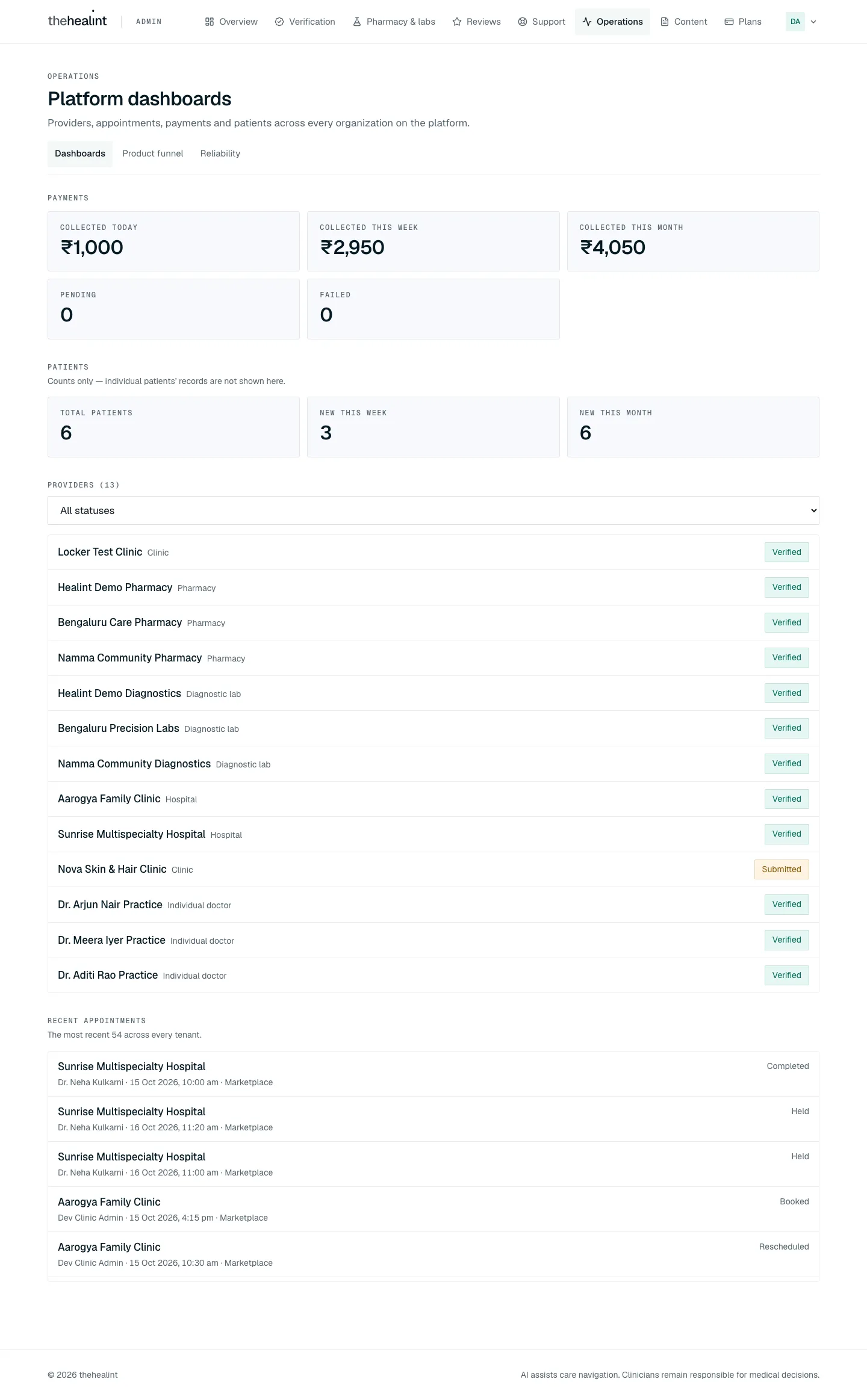
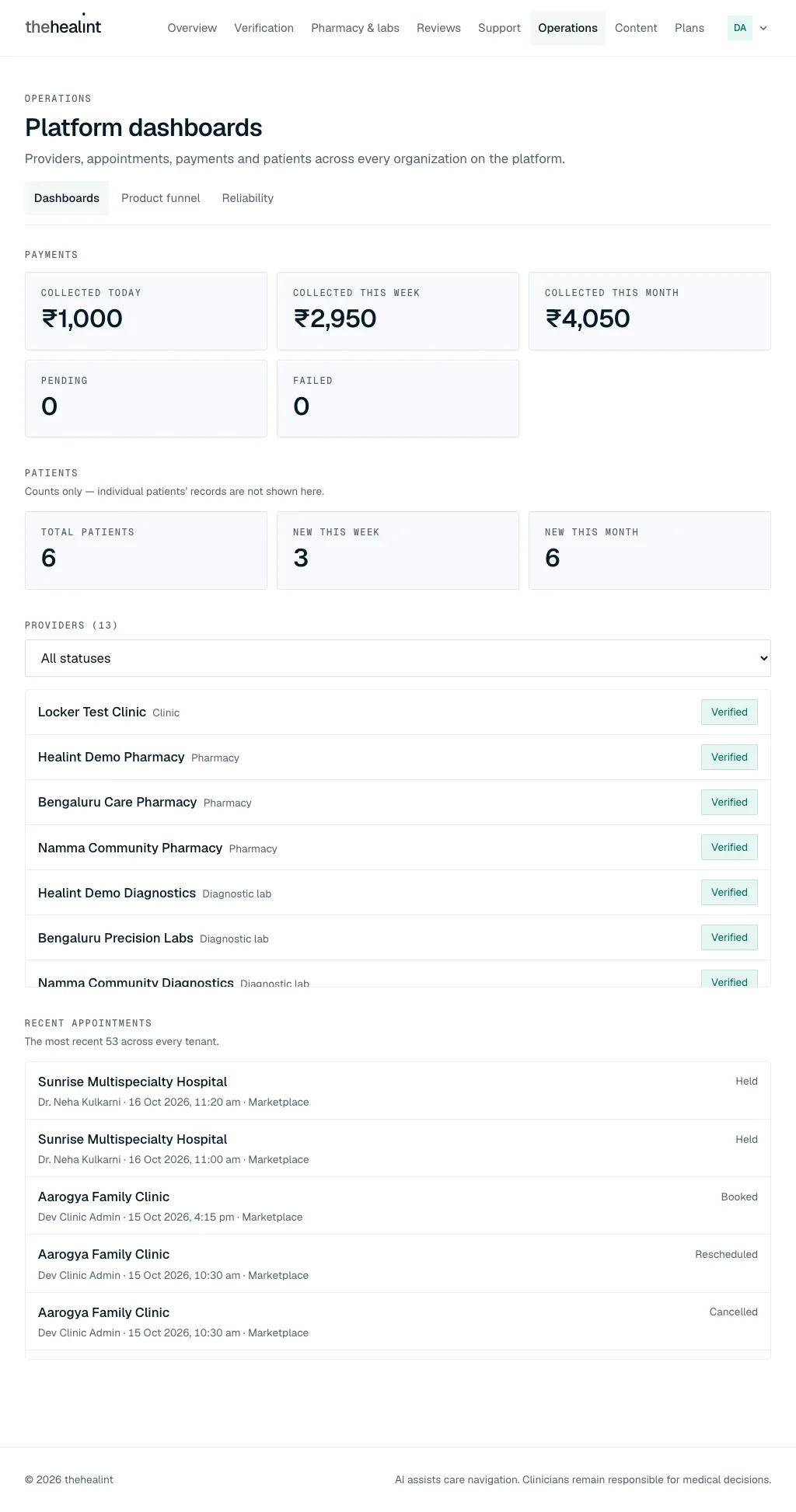
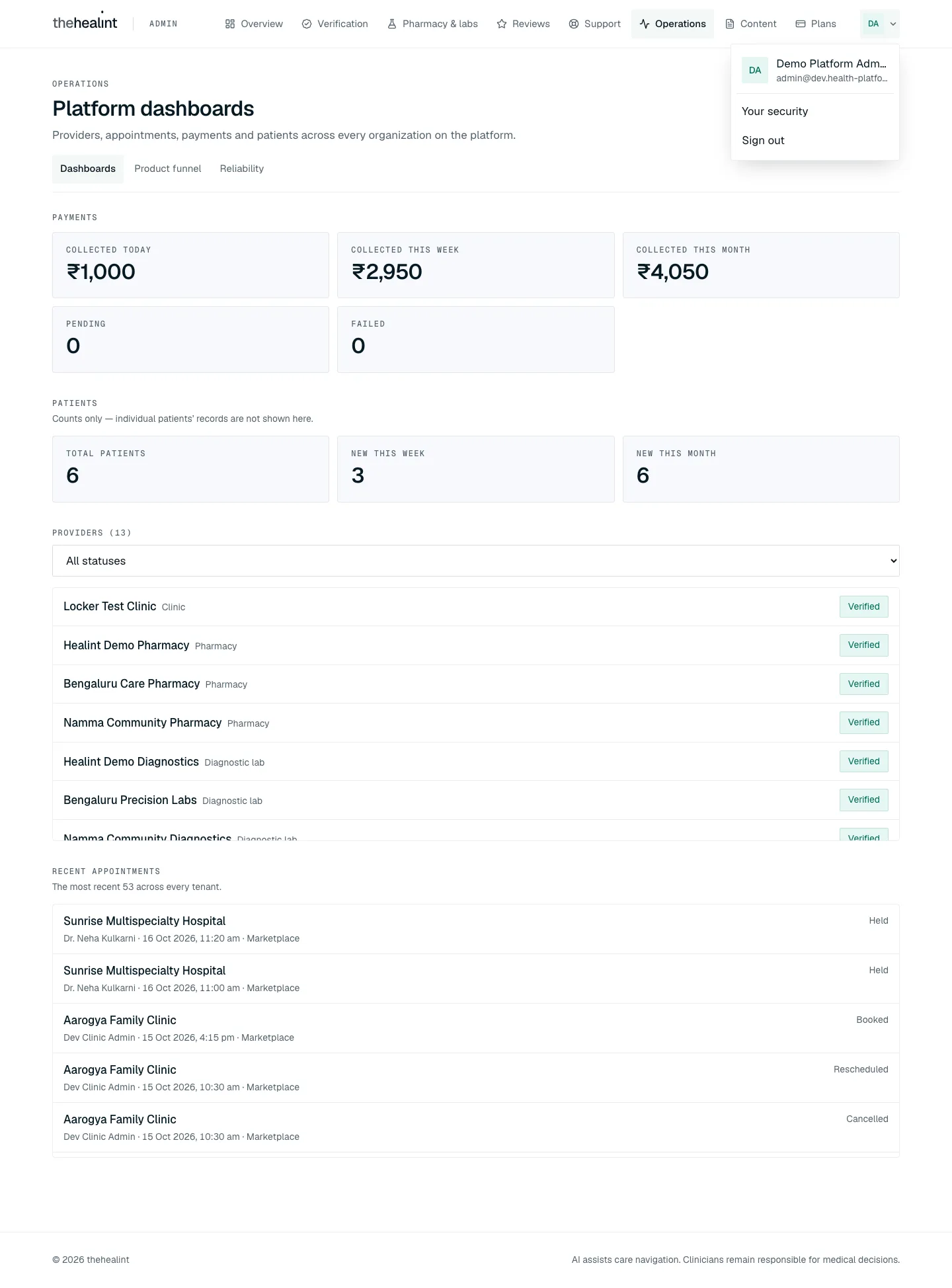
- Operations → "Platform dashboards". Lead text: "Providers, appointments, payments and patients across every organization on the platform."
- Payments: Collected today, Collected this week, Collected this month, Pending and Failed (
GET /api/v1/admin/ops/payments/summary). - Patients: Total patients, New this week, New this month. A note reads "Counts only — individual patients' records are not shown here."
- Providers (n): filterable by status (All statuses, Submitted, Under review, Verified, Rejected). Each name links to Tenant 360. Empty: "No providers yet." (or "No providers are
."). - Recent appointments: "The most recent n across every tenant." Empty: "No appointments have been booked yet."
- States. Each block has its own loading message ("Loading payments…" and so on) and an error message with Retry.
Product funnel (/analytics)#
- "Product funnel". Lead text: "Where patients drop out between a search and a booked follow-up, platform-wide." The user picks From and To dates and clicks Refresh.
- Steps. Search started, Search completed, Provider viewed, Slots viewed, Slot selected, Booking started, Booking completed, Checked in, Completed, Follow-up booked.
- Empty. "No funnel events in this range.", with the hint "Widen the dates, or check that the analytics collector is running."
Reliability (/reliability)#
- "Reliability". Lead text: "Availability, latency, error budget, real-user performance and alert history from production telemetry." A row of window buttons switches the time range (
GET /api/v1/admin/ops/reliability?window=). - Service SLOs. One card per service shows an availability percentage, green when on target and red when below. It also shows Requests, Budget left, p95 and p99. Empty: "No request telemetry in this window."
- Real-user performance. A table with columns App, Metric, p75, Good and Samples, built from browser web vitals. Empty: "No browser samples in this window."
- Alert escalation history. Each alert shows severity · state, time and summary. Empty: "No alert events in this window."
Dead-letter and replay, synthetic monitoring#
- Delivery failures (
/deliveries). Admin and support can filter failed and dead-lettered notifications across organizations by status, channel or search text. The list deliberately omits recipient identity and template payload. Platform administrators additionally see Replay, which requires confirmation and queues one idempotent attempt; support sees Administrator required instead. Saved views keep a set of filters under a name (private, or shared with all platform staff); only the owner can rename, share or delete one (/api/v1/saved-views,admin.deliveriessurface). Feature flags (Plans → Feature flags,/api/v1/admin/feature-flags, permissionfeature_flag.manage, platform admin only): operational rollout switches separate from plan entitlements — percentage rollout (stable per organization), role limit, per-organization overrides, mandatory expiry (≤ 180 days, expired = off); callers only receive on/off viaGET /api/v1/feature-flags/me; every change audited. Region settings (organization detail → Region,PATCH /api/v1/admin/tenants/:id/locale, permissiontenant.locale.manage, platform admin only):locale,currency,timeZoneon the tenant, validated against what the runtime supports; ProviderOS formats money, dates, times and "today" from them via@health-platform/ui's locale module (default en-IN / INR / Asia/Kolkata). Display only for now: slot generation and reminders still run on Asia/Kolkata, and patient-web uses the default. The new attempt keeps a link to the original failure and the action is audited. - Synthetic monitoring has no screen. It is a GitHub Actions workflow, "Production synthetic monitoring" (
.github/workflows/synthetic-monitoring.yml), that runs hourly. Its results are not shown in admin web.
Journey 8: Moderate reviews#
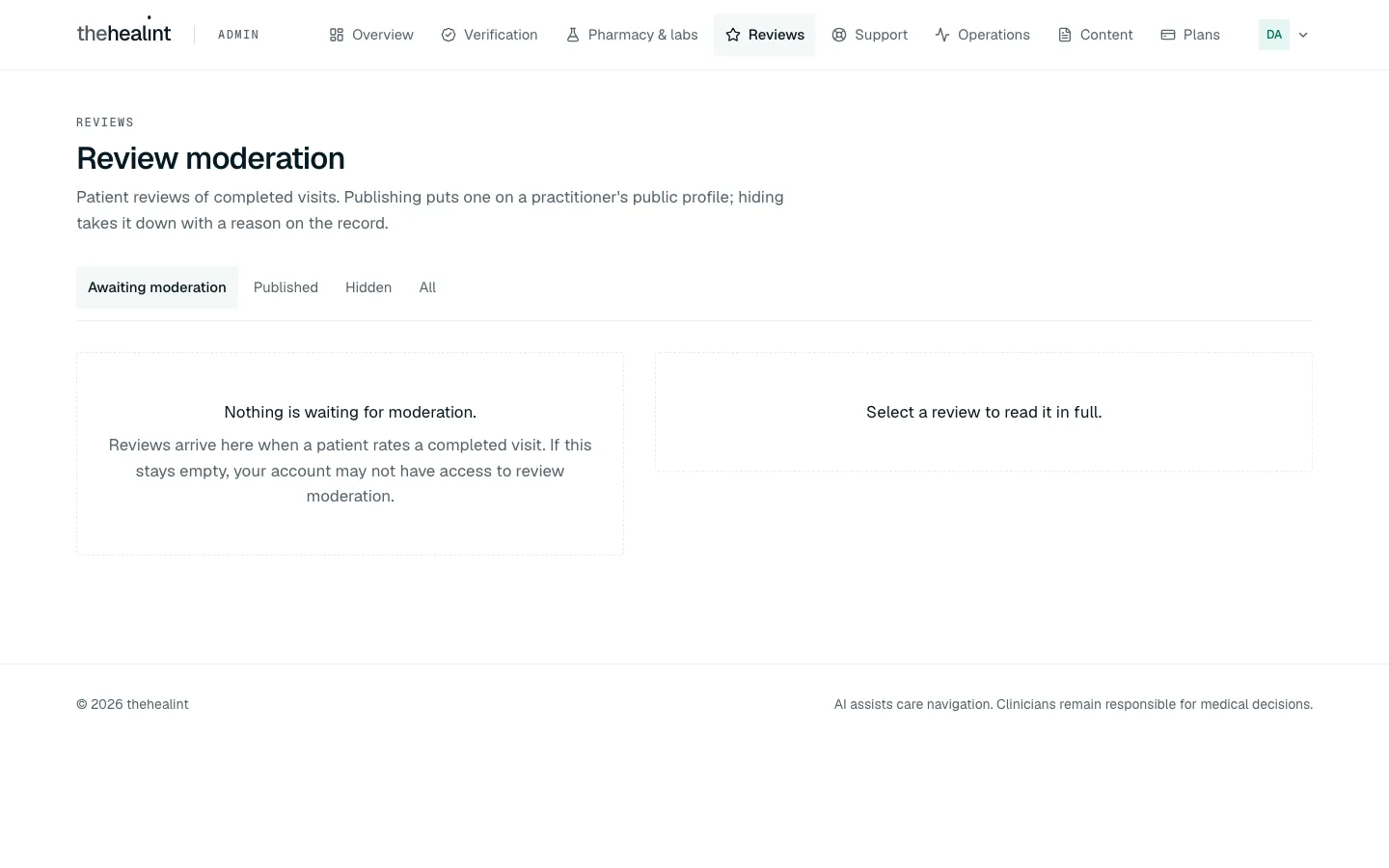
Reviews → "Review moderation". Lead text: "Patient reviews of completed visits. Publishing puts one on a practitioner's public profile; hiding takes it down with a reason on the record."
- Filters: Awaiting moderation, Published, Hidden, All.
- Each row shows the rating, a status pill (Pending, Published, Hidden) and the comment, or "No written comment — rating only."
- Empty: "Nothing is waiting for moderation." (or "No reviews match this filter.").
Select a review. Before a selection the panel reads "Select a review to read it in full." The detail shows the rating, full comment, About (practitioner), the organization, Visit date, Submitted date, and "The practice's public response" if there is one.
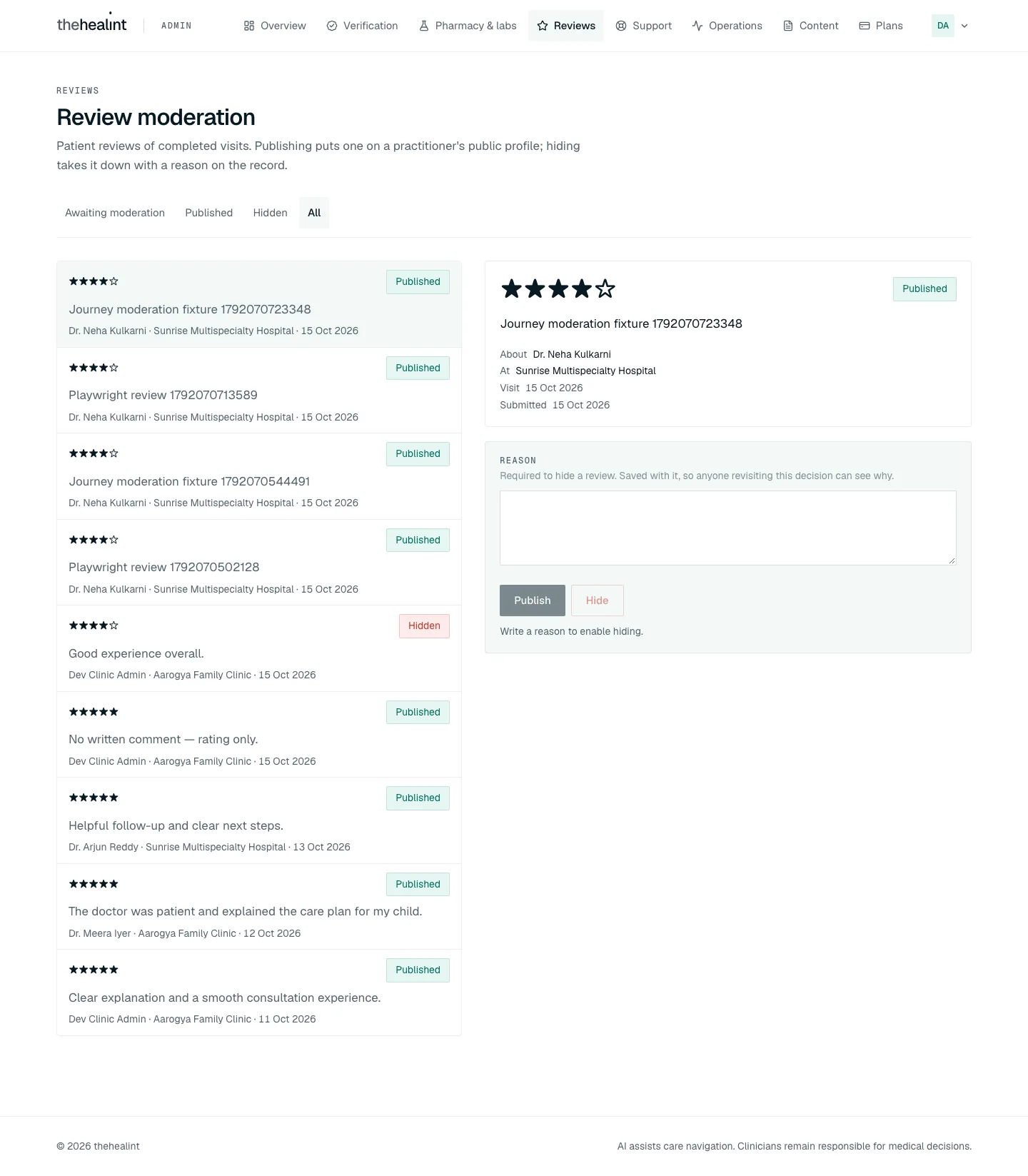
Admin web (desktop) — the All filter with a Published review selected: stars, comment, About, At, Visit and Submitted dates, the Reason box, a disabled Publish (already published), Hide, and "Write a reason to enable hiding." 
Admin web (phone width) — the selected review and the Reason box appear below the whole list, so on a phone the moderator has to scroll past every review to act. Publish. Disabled if the review is already published. The confirmation reads "This review appears on the practitioner's public profile immediately, visible to anyone browsing the marketplace signed out." Button: Publish review.
Hide. Requires a Reason ("Required to hide a review. Saved with it, so anyone revisiting this decision can see why."). Until there is one, the screen shows "Write a reason to enable hiding." The confirmation, "Hide this review?", quotes the reason. Button: Hide review.
What the system does.
PATCH /api/v1/reviews/:id/moderatesaves the decision. A failure shows "Could not record that moderation decision." No notification is sent to the patient or the practice.
Journey 9: Answer support tickets#
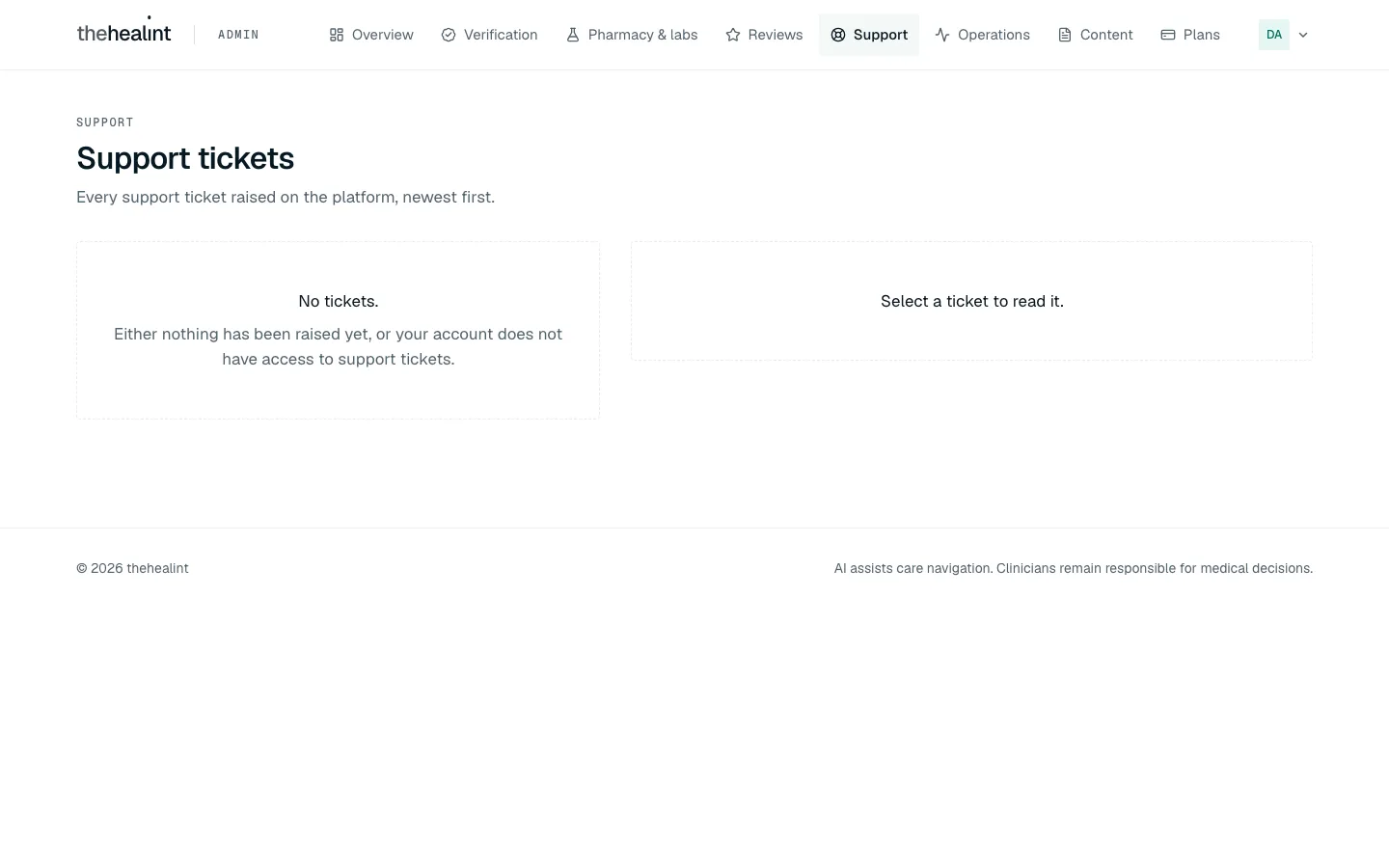
- Support → "Support tickets". Lead text: "Every support ticket raised on the platform, newest first." Each row shows the subject and a status pill (Open, In progress, Resolved, Closed).
- Empty: "No tickets.", with the hint "Either nothing has been raised yet, or your account does not have access to support tickets."
- Open a ticket. Before a selection: "Select a ticket to read it." The detail shows:
- The status.
- If the ticket names a record, a Scoped record card ("Exactly the one record this ticket names — never a broader query. No clinical note or diagnosis text is ever included here."), showing the record's raw data.
- The message thread, each message with its time.
- Reply. The user types in Reply and clicks Send reply ("Sending…"). This calls
POST /api/v1/support/tickets/:id/messages. - Advance the status. A single button moves the ticket one step forward: Open → In progress → Resolved → Closed. The label uses the raw status word, for example "Mark IN_PROGRESS". Closing asks to confirm: "A closed ticket has no next status — it cannot be reopened from this screen, and the person who raised it will need a new ticket to continue."
Journey 10: Manage plans#
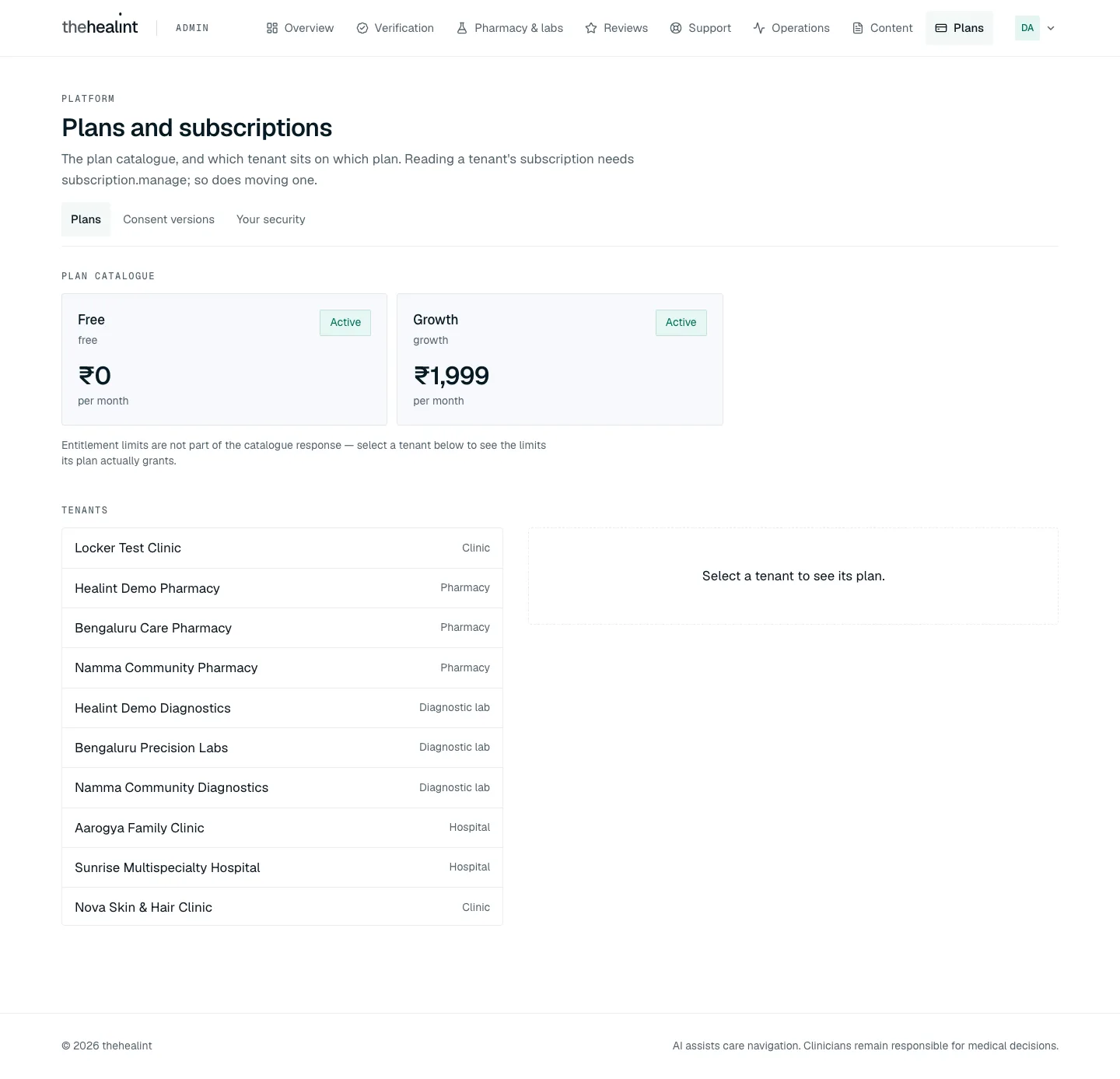
Plans → "Plans and subscriptions". Lead text: "Requests from clinics to change plan, the plan catalogue, and which organization is on which plan."
- Plan requests (Release 1.3) is at the top: each clinic request (organization → plan, who asked, when, current plan, note) with Approve and Decline (
GET /api/v1/admin/plan-requests,PATCH /api/v1/admin/plan-requests/:id,subscription.manage). Approve assigns the plan at once; Decline needs a note. The clinic's admins are emailed either way, and both actions are audited. Requests also appear as a Plan requests lane in the Work inbox.
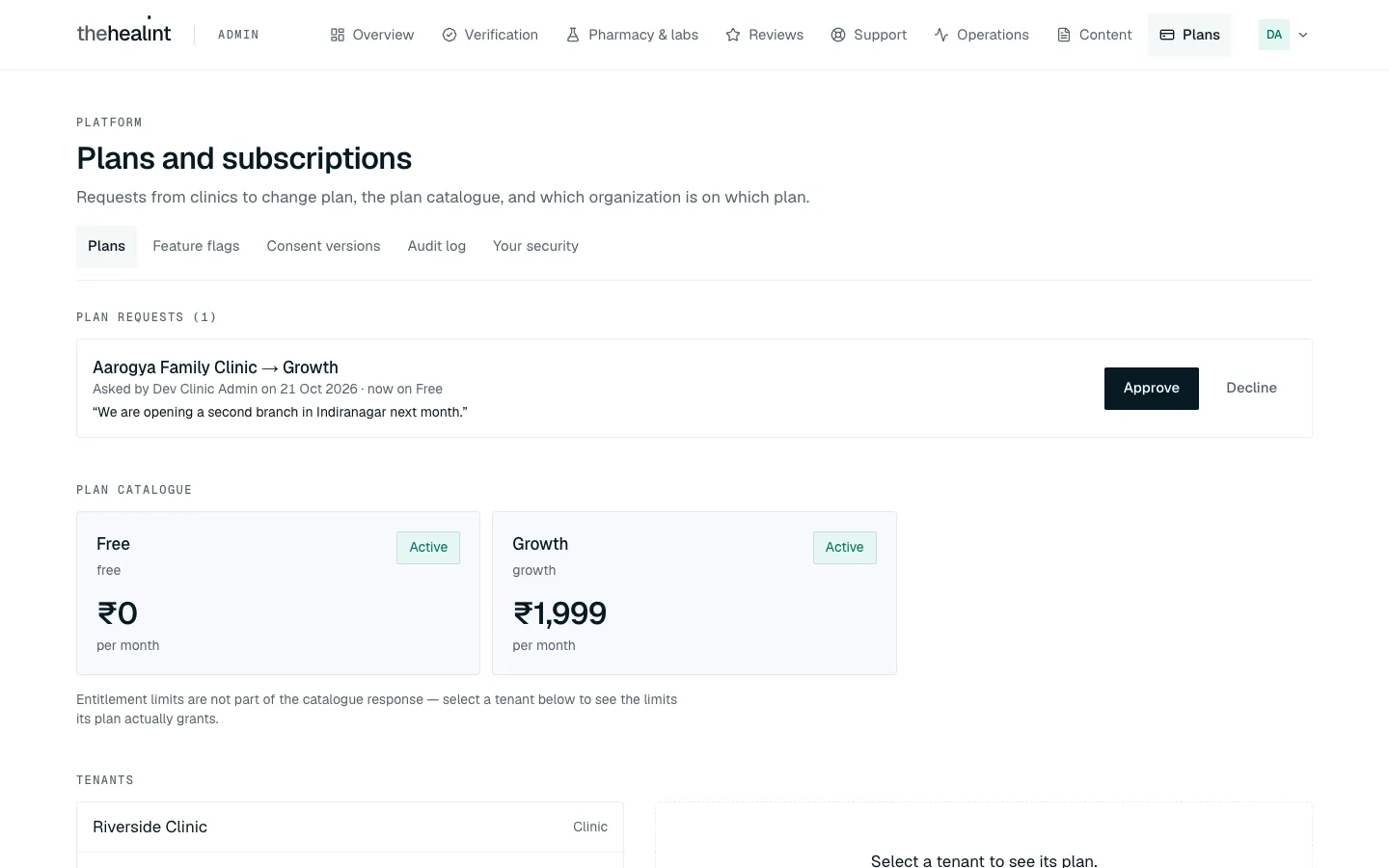
Admin web (desktop) — Plans: one request from Aarogya Family Clinic (Free → Growth) with its note, above the catalogue. - Plan requests (Release 1.3) is at the top: each clinic request (organization → plan, who asked, when, current plan, note) with Approve and Decline (
Plan catalogue. Each plan is marked Active or Retired. Empty: "No plans defined." Plans can't be created or edited here.
Tenants → select one. Before a selection: "Select a tenant to see its plan." The detail shows the current plan, Price, Trial ends and Period ends.
Choose a Plan and confirm. The field hint reads "Takes effect immediately — there is no scheduled or end-of-period change."
- The dialog title is "Move
to ?" (or "Assign ?"). It explains that entitlements switch on the next request, and that existing records above a lower limit are kept but no more can be added. - Button: Change plan or Assign plan.
- The dialog title is "Move
Journey 11: Maintain reference data and the knowledge base#
- Content → "Reference data". Lead text: "The platform-wide vocabularies every tenant's profile and every patient's search resolve against."
- Tabs: Specialties, Services, Symptom terms, Search synonyms, Cities, Localities.
- Specialties and services can be added and edited. The other tabs are add-only.
- Example empty state: "No cities yet.", with the hint "A branch cannot be placed until its city exists."
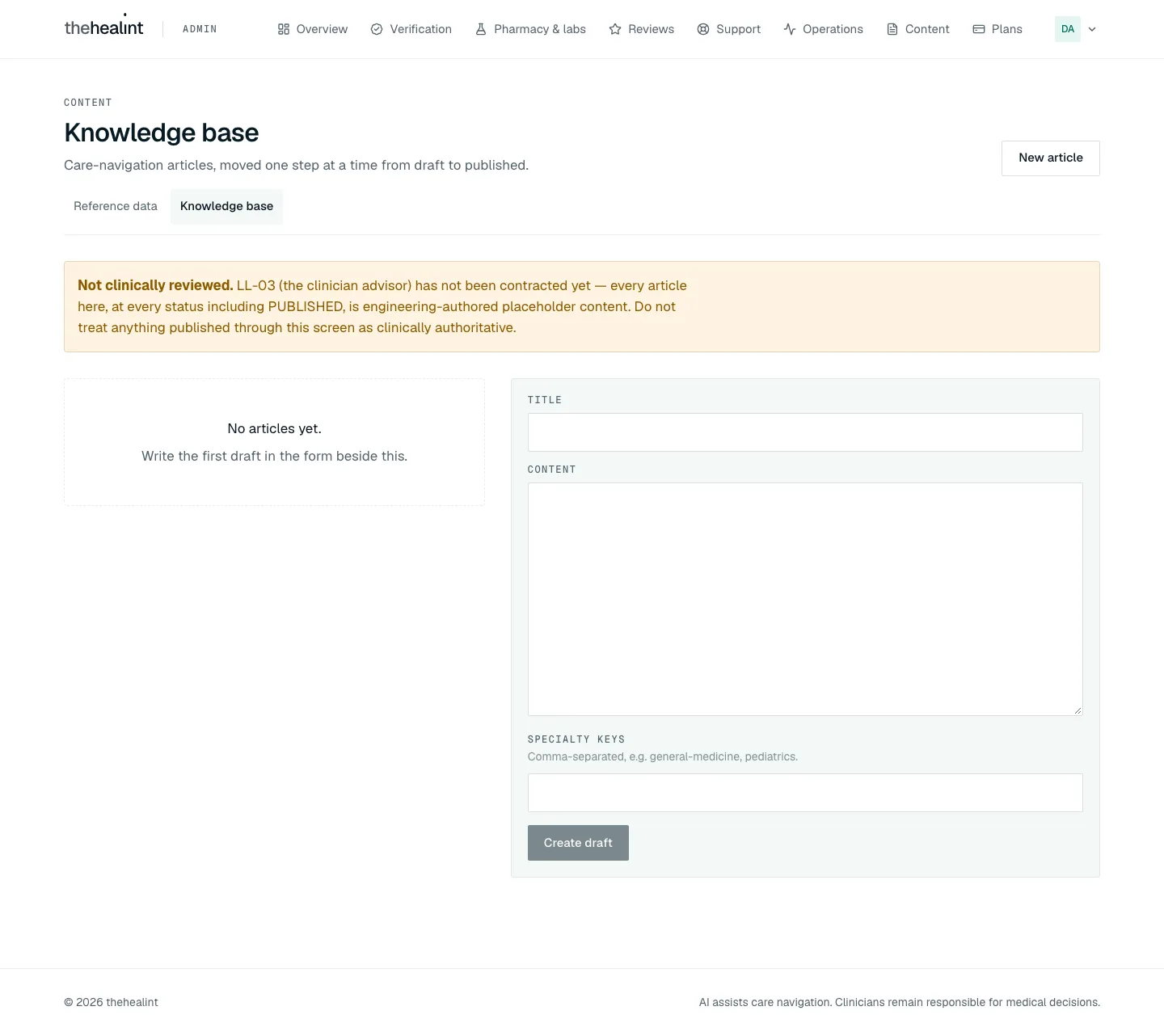
- Knowledge base. Lead text: "Care-navigation articles, moved one step at a time from draft to published."
- An article is written in a side form.
- Then it moves one step at a time: Submit for review → Approve → Publish → Archive. Send back to draft is also available.
- Publish, Archive and Send back each ask to confirm.
- Empty: "No articles yet."
Journey 12: Publish a consent version#
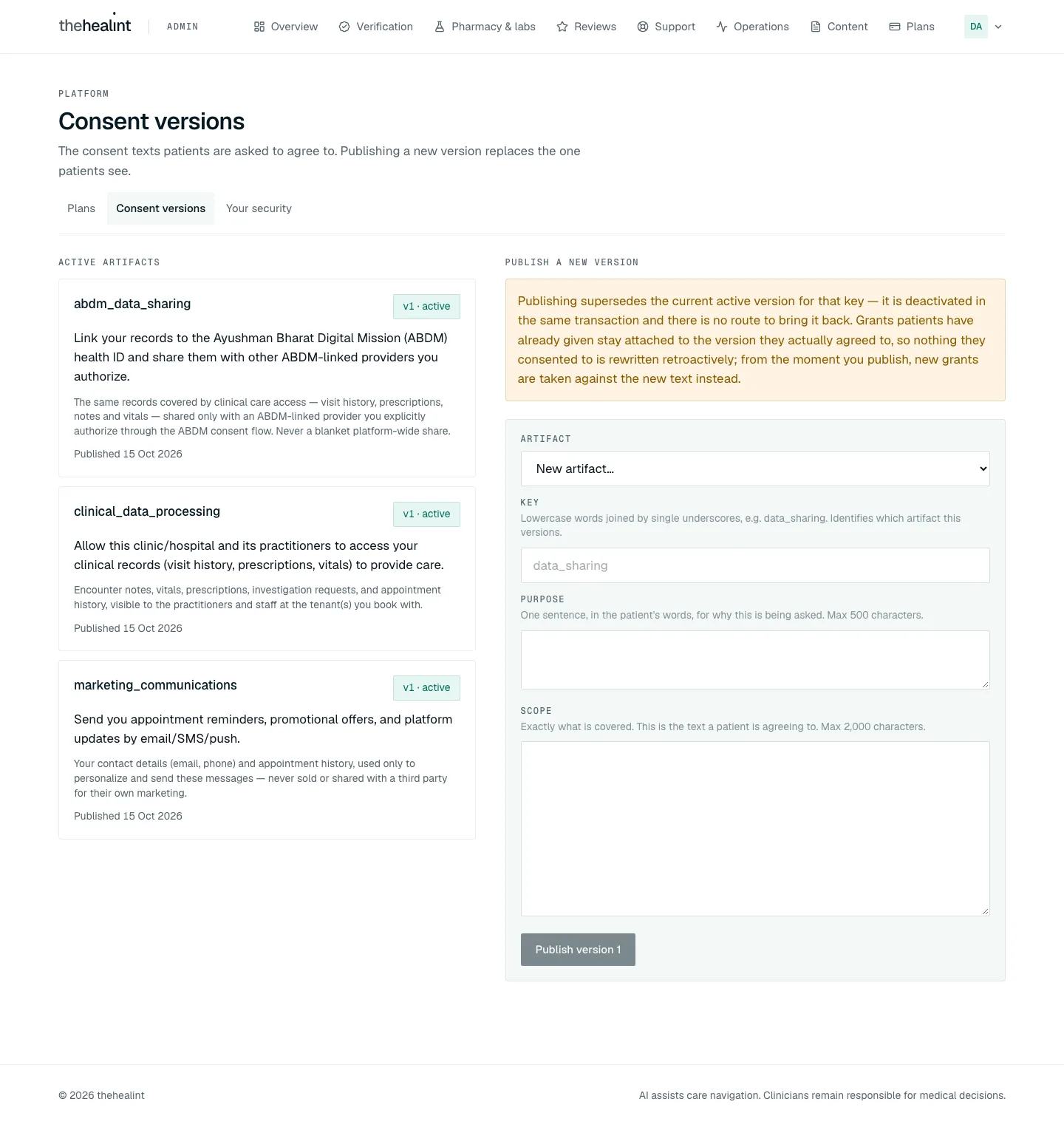
- Consent versions. Lead text: "The consent texts patients are asked to agree to. Publishing a new version replaces the one patients see." Active artifacts lists the current consent texts. Empty: "No active consent artifacts."
- Publish a new version. The user picks an Artifact (or "New artifact…"), then fills in:
- Key, for example
data_sharing. - Purpose: up to 500 characters.
- Scope: up to 2,000 characters.
- Key, for example
- Confirm.
- "Supersede
v ?" explains that the old version is deactivated permanently and that existing patient grants keep pointing at it. Button: Publish v<n+1>. - For a new key, the dialog title is "Publish
v1?" and the button is Publish version 1.
- "Supersede
Journey 13: Read the audit log#
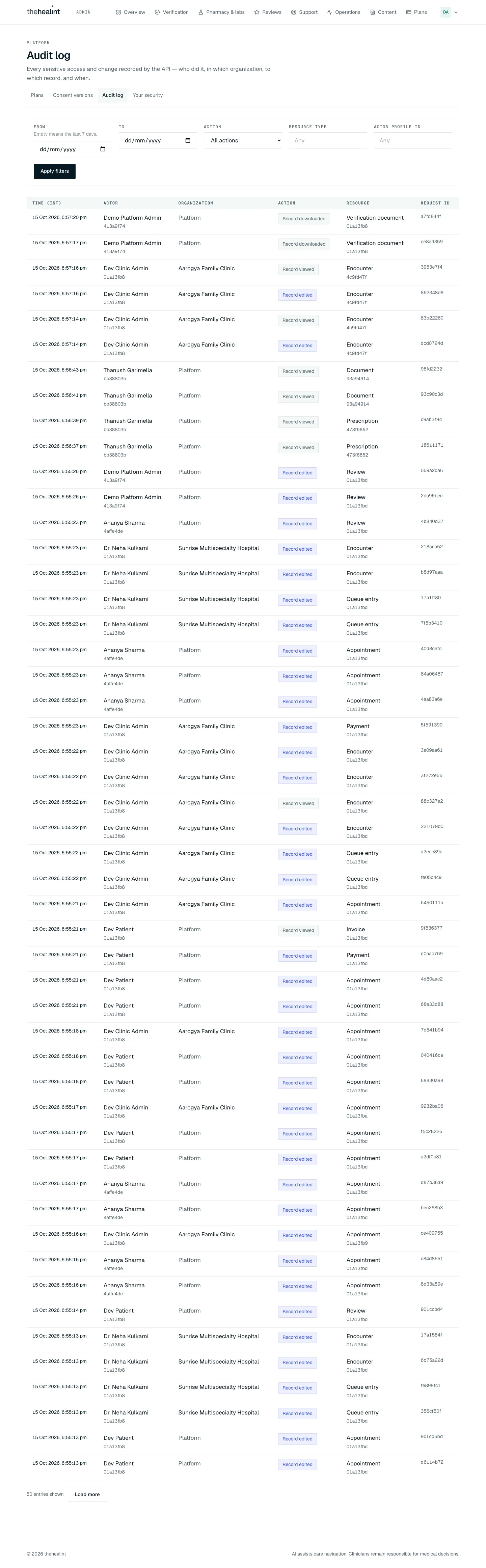
- Audit log (
/audit, from the Platform sub-menu or Overview's All sections). Eyebrow "Platform", lead "Every sensitive access and change recorded by the API — who did it, in which organization, to which record, and when." →GET /api/v1/admin/audit-logs. - Filters: From and To (calendar days in IST; an empty From means the last 7 days), Action (All actions or one action), Resource type (snake_case, for example
verification_document), Actor profile id (a full UUID) → Apply filters.- Validation: "Use the snake_case type, e.g. verification_document.", "Paste a full profile id (a UUID).", "The end date is before the start date."
- Table, newest first: Time (IST), Actor, Organization, Action, Resource, Request id. "n entries shown" with Load more when there are more ("n entries, all shown" when not).
- Empty: "Nothing was recorded in the last 7 days. — Entries appear here as soon as someone opens, downloads or changes an audited record." or, with filters, "No entries match these filters. — Widen the date range or clear a filter. Dates are calendar days in IST."
- Click a row → a drawer titled with the action and the time: Actor, Actor profile id, Organization ("Platform (no organization)" when none), Organization id, Resource type, Resource id, Request id, Entry id, and Metadata ("No extra context was recorded for this entry." when empty).
- Who can read it. Platform admins only. The API checks
audit.readfrom a platform role (a tenant admin's ownaudit.readdoes not reach this route), and a row-level-security policy (20261104000001_audit_log_platform_admin_read.sql) only lets an activePLATFORM_ADMINread other organizations' rows. Platform support sees "Your account can't read the platform audit log — it is limited to platform administrators." - The page is read-only. The audit log stays append-only.
Role × capability#
| Capability | Platform admin | Platform support |
|---|---|---|
| Sign in to admin web | Yes | Yes |
| See every menu item | Yes | Yes. Nothing is hidden, and forbidden actions fail with an API error |
| Organization verification (queue, documents, decide) | Yes (tenant.verification.review) | No |
| Pharmacy, lab and credential verification | Yes (fulfillment.verify) | No |
| Tenant 360 page | Yes | No (shows "Organization not found") |
| Operations, Reliability | Yes (platform.ops.read) | Yes |
| Product funnel | Yes (analytics.read) | Yes |
| Review moderation | Yes (reviews.moderate) | Yes |
| Support tickets | Yes (support.manage) | Yes |
| Reference data | Yes (content.manage) | Yes |
| Knowledge base, every step including Publish | Yes (kb.manage) | Yes |
| View or assign plans | Yes (subscription.manage) | No |
| Publish consent versions | Yes (consent.manage) | No |
| Own two-factor setup | Yes | Yes |
Read the audit log (/audit) | Yes (audit.read) | No (refused by the API) |
| Manage platform staff accounts | No screen or API (seeded only) | No |
Grants are in supabase/migrations:
20261015000001_admin_content_reviews_subscriptions.sql: content, reviews, analytics, support.20261016000001_platform_ops.sql:platform.ops.read.20261014000001_care_navigation.sql:kb.manage.20261013000001_notification_read_permission.sql.20261101000001_fulfillment_network.sql:fulfillment.verify, admin only.
Permissions & privacy#
- Separate portal. Admin web is separate from ProviderOS and User web, and each app turns away accounts that belong elsewhere.
- Every action is checked by the API. The UI does not hide anything by role; each request is checked against the role's permissions on the server.
- Two-factor check. Once an account has enrolled an authenticator, the API refuses requests from sessions that have not passed the code check. Enrolment itself is voluntary.
- Minimal patient data. Operations shows patient counts only. Support's scoped-record card shows only the one record a ticket names, with no clinical note text.
- Signed, audited downloads. Verification documents and licence evidence open through short-lived signed links. Fulfilment evidence downloads are audited.
- Decisions keep their reasons. Verification decisions store notes in a history (required for pharmacy, lab and credential decisions). Hidden reviews store their reason. Consent versions are never changed in place; publishing a new version supersedes the old one.
Gaps & known limitations#
- Two-factor is optional for platform staff. An admin who never enrols signs in with a password alone. The security page itself says "your sign-in code alone unlocks every tenant's data."
- Support sees every screen. Nothing is hidden for
PLATFORM_SUPPORT. They only discover what they can't do through 403 errors, "Your account can't see this queue." or "Organization not found". No audit-log viewer— fixed: Audit log (/audit), platform admins only (Journey 13).No platform-wide dead-letter or replay console— fixed: Operations → Delivery failures is PHI-minimised, filterable and paginated; platform-admin replay is idempotent and audited.- No synthetic-monitoring view. It runs only as an hourly GitHub Action.
- No staff management. Platform staff can't be added, removed or have their role changed from any screen or API.
- No verification of individual practitioners. Only organizations, facilities and fulfilment credentials are verified.
- Few notifications on admin decisions. Organization approval and rejection now email the organization's clinic and hospital admins. Facility and credential decisions (including suspension) and review moderation still send nothing.
The reject dialog's claim was false— fixed: the rejection email is sent, with the note as "What to fix".The approve dialog overstated the effect— fixed: it now says branches appear once the organization publishes itself.- Notes are inconsistent. They are optional when rejecting an organization, but required (at least 3 characters) for facility and credential decisions.
- Raw status words leak into the UI. The support button reads "Mark IN_PROGRESS". (The verification queue pill now reads "Awaiting review"; the queue screenshot predates that.)
- Support tickets are basic. There is no assignment, no priority, no author on messages, and no reopen in the UI. Scoped records are shown as raw data. The list is capped at 200 tickets.
- Plan changes are audited now (direct changes and request decisions). There is still no scheduled or end-of-period change, and no way to edit the plan catalogue.
- No separation of duties in the knowledge base. The same person, including platform support, can write, approve and publish an article.
- Tenant 360 is read-only and admin-only. Platform support can't open it.
- Inbox items mostly don't deep-link. Organizations now open straight to
/verification?tenant=<id>; facilities, professionals, reviews and tickets still open the section, not the specific item. - Pharmacy and lab gaps. For the operator-facing issues, such as suspended facilities having no way back and rejection notes not being shown, see 05-pharmacy-lab.md.
Marketing admin (hi-home)#
The marketing site (hi-home, a separate repository) collects two kinds of submission and lets a marketing admin read them.
What visitors submit.
- Contact form (
POST /api/contact): name, email, mobile and message (10–4,000 characters). - Careers application (
POST /api/careers): a developer or sales track. Fields are name, email, mobile, location, years of experience, about (at least 30 characters), role, and stack (developer) or market (sales), plus an optional portfolio link. - No file uploads. There are no CV uploads.
- Storage and retries. Both forms require an idempotency key so a double-submit does not create duplicates. Submissions are saved in MongoDB (
enquiries,applications). If saving fails, the visitor sees "We could not safely save this application. Please try again shortly."
How submissions are delivered. If a delivery webhook is configured, each submission is forwarded to it; otherwise it is simply marked stored.
- A failed delivery is retried up to 8 times. The backoff starts at 5 minutes and caps at 24 hours.
- The retry job runs only once a day (cron at 03:00), so the shorter backoffs are never honoured.
- If an ops alert webhook is set, it is notified on the first failure and when retries are exhausted.
- No email goes to the submitter or the team.
Reviewing at /protected.
- "Submissions" (Restricted) sign-in. The card reads "Use your organization identity. Access requires SSO, the marketing admin role, and MFA." The admin clicks Continue with Google SSO.
- Role check. The account must have
marketing_adminin its Supabase app metadata. Otherwise: "This identity does not have themarketing_adminrole.", with Sign out. - Mandatory MFA. "Complete the required authenticator check." On first use, a QR code and manual key are shown. The admin enters the Six-digit code and clicks Verify and continue. The data is fetched on the server only after these checks pass, and each view is logged to an admin audit collection.
- The Submissions page.
- A header reads "n enquiries · m applications", or "Not connected to the database — set MONGODB_URI.". There is a Sign out button.
- Tabs: Enquiries, Applications, Delivery failures, plus a search box.
- Rows are read-only, with mailto and tel links.
- Empty: "No enquiries yet. They will appear here as they come in." (or "No … match that search.").
- If the database is down: "Database unreachable".
- Delivery failures → Replay now. This forces another delivery attempt. The button reads "Replaying…", then "Replayed" or "Replay failed.". The replay is audited.
Gaps (hi-home).
- No status, assignment, notes or export for submissions; rows are read-only.
- No acknowledgement email to submitters and no team email; the webhook is the only outlet.
- The daily cron undercuts the 5-minute retry backoff.
- No spam or bot protection (no captcha or rate limit).
- Marketing admins can only be added through Supabase app metadata by hand.
Related#
- 01-patient.md: reviews, consent and support from the patient's side.
- 02-doctor.md: practitioners whose reviews are moderated here.
- 03-front-desk.md: reception staff.
- 04-clinic-admin.md: organization onboarding and submitting for verification.
- 05-pharmacy-lab.md: the pharmacy and lab operator side of facility and credential verification.
Time zone and currency per organization (phase 2, Oct 2026)#
Beyond display, the API now uses the organization's zone for slot generation, the booking/check-in day rule, walk-ins, the queue's "today", billing and analytics day bounds, the "available today" search badge, covering-access date ranges and the follow-up reminder time (common/time-zone.ts: daylight saving, skipped and repeated hours handled; TenantTimeZoneService caches the zone for a minute and is cleared when an administrator changes it). Platform-wide funnel figures stay on India time. Not yet zone-aware: the notification worker's "send at" for non-follow-up emails (they send immediately) and any scheduled export.
Legal pages#
Terms, Privacy and Cookies are versioned pages on the marketing site, with company details read from src/lib/legal.ts (npm run legal:check lists what is missing).
PDF version
The same guide with all its screenshots, to print or share. (1.7 MB)
Download the PDF Open in a new tab
Loading the PDF viewer… If it does not appear, your browser cannot show PDFs inside a page: use Download the PDF.